About this app
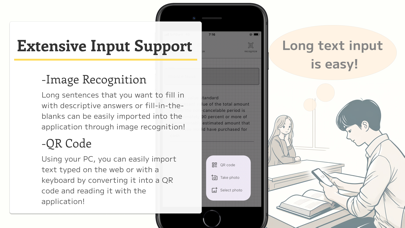
This app is a support tool for all kinds of learners, from high school students, college students, and even adults, to learn writing questions for tests and certification exams with the app. Writing questions can certainly be improved by actually writing a lot. However, simply solving problems sometimes makes it difficult to realize that progress. Our app allows you to visualize your achievements and look back at your past solutions. By looking back, you can compare your past and current understanding, and identify future challenges and areas for improvement. This will be the driving force that keeps you motivated to continue practicing the writing exercises. Reflection and ongoing motivation to practice writing exercises will increase your chances of practicing writing questions. If you are concerned about your motivation for writing questions as you move forward with your self-study challenge, or if you are studying at a school or prep school and have difficulty with writing questions, explore new ways to overcome the common challenges of writing questions. How to use the app: -Comparison mode (1) Input model answers and user answers: Input the model answers you want to use as reference and the answers you want to compare into the application. (2) Image recognition: To save you the trouble of entering model answers and answers, the app can also recognize text from photos or saved images. Handwritten notes can also be read with a certain degree of care. (3) Comparison with Model Answers: The entered answers are compared with the model answers to see if they differ. Note: Answers are provided to the AI for comparison. Please do not input any confidential or personal information. (4) Accumulation and review of growth: Answers are stored in the application and the learning process can be reviewed in chronological order. -Fill-in-the-blank(Hole) mode (1) Input sentences to be filled in: The data is the same as the model answers in the sentence comparison mode. (2) Fill-in-the-blank questions: Select a question, and the AI will automatically generate a fill-in-the-blank question. and the questions will be different each time, increasing flexibility and efficiency of learning. Note: Answers are provided to the AI when creating the fill-in-the-blanks. Do not enter confidential or personal information. This application can be used for any subject or field of study and supports deeper understanding of texts. It is a tool for preparing for certification exams, schoolwork, and other personal knowledge extensions. Download it now and take your learning to a new stage.
Latest release
What’s New
-The number of characters that can be entered has been increased to 1,000 -Changed the UI for selecting the learning mode
Audience growth
Ratings growth
Baseline captured. Growth appears after the crawler observes a changed rating count.
Momentum comes from crawler snapshots for the tracked storefront. “Viral growth signal” means unusually fast recent rating gains; it is an indicator, not download data.
Price tracking
Price intelligence
First snapshot captured. The trend line starts after the next crawler price observation.
- First observed Aug 21, 2026 · 1:34 AM Free
Screenshots