About this app
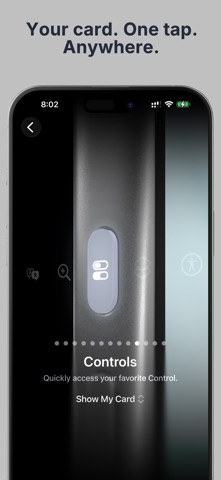
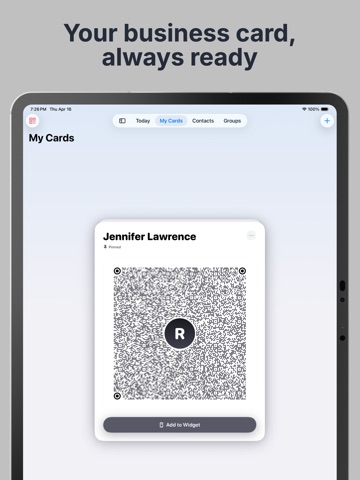
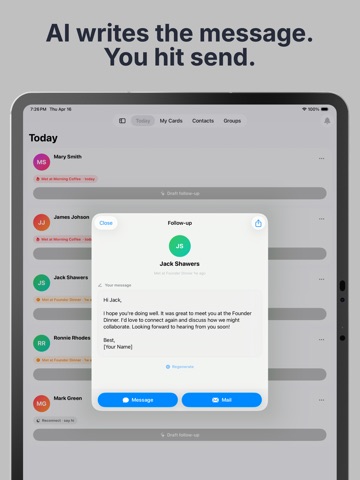
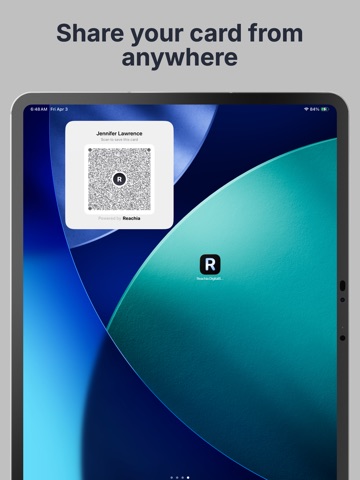
Never lose a connection again. You meet someone great — at an event, a meeting, a coffee. You mean to follow up. Then life gets busy, and a month later you can't even remember their name. Reachia fixes that, in three easy steps: 1. SHOW YOUR CARD — they scan it, no app needed on their side 2. SAVE THEM — one tap, even with no business card 3. FOLLOW UP — every morning, Reachia tells you exactly who to message That's it. No CRM. No spreadsheet. No work. SHOW YOUR CARD IN ONE TAP Your own QR business card. Open it from Control Center, your Action Button, Siri, or a Home Screen widget. The screen brightens so people can scan it from across the room — no app, no typing, no paper. Make as many cards as you like — one for the day job, one for the side business. SHARE IT ANY WAY YOU LIKE Write your card to an NFC sticker or tag, so people get your details with a tap. Or text your card straight to someone. Or scan theirs. SAVE ANYONE IN SECONDS No card? Tap +, type their name, done. Add a number, a note, or where you met if you want. Point your camera at a paper card and Reachia fills in the details — just tap Done. Or import from your iPhone contacts. Everyone you save lands in your iPhone's Contacts too. NEVER FORGET TO FOLLOW UP This is what makes Reachia different. Open Today and see exactly who to reach out to, ranked for you: Reach out now, This week, and Keep warm. Tap a name to see your notes. Changed your mind? Tap Undo. SOMEONE SENT YOU A LEAD? Note who referred them, and Reachia reminds you to thank the person who did — and to chase the lead itself. THE EVENING-AFTER RECAP Just got back from an event? Reachia lists everyone you met so you can jot a line each while the conversations are still fresh, and star whoever should hear from you first. CATCH-UP BRIEF Before you message someone, see where you met, when you last spoke, and what you talked about. Never send an awkward "remind me how we met?" again. FOLLOW-UP WIDGET — FREE Your follow-ups on your Home Screen or Lock Screen. Tap Done the moment you've reached out — no need to open the app. It keeps working even if your subscription lapses. GENTLE NUDGES A friendly morning reminder, plus a nudge a day or two after you meet someone new — while they still remember you. Touch and hold to mark done or snooze, without opening the app. ASK REACHIA — JUST ASK, IN PLAIN ENGLISH "Who haven't I followed up with in 30 days?" "Draft a check-in for Sarah." "Remind me to call Maria tomorrow at 3pm." Reachia finds people, writes messages you send from Messages or Mail, and sets reminders — even real alarms. It runs on Apple Intelligence, right on your device. (Requires iOS 26 and Apple Intelligence: iPhone 15 Pro or later, or iPad with M1 or later.) PRIVATE, ON YOUR DEVICE Your tags, messages, and conversation starters are created on your device. Your AI never sends your data to a server. FIND ANYONE — EVEN IF YOU FORGET THEIR NAME Search by company, job title, notes, tags, or where you met. If you remember anything at all, Reachia finds them — and they show up in your iPhone's own search too. REMEMBER WHERE YOU MET One tap saves the place. See every event and every person on a map and a timeline. YOUR DATA IS YOURS Export everything anytime — notes, tags, groups, and reminder dates included. 7 COLOR THEMES Give your card your own style. IPHONE AND IPAD Your contacts, notes, tags, groups and cards stay in sync through your own private iCloud. PRICING Start with a free trial, then continue with a subscription. Cancel anytime. Privacy Policy: https://fierce-inlet-63133.herokuapp.com/reachia-privacy Terms of Use: https://www.apple.com/legal/internet-services/itunes/dev/stdeula/
Latest release
What’s New
Show your card in one tap Open My Cards and tap "Show My Card" — your code fills the screen, bright and easy for anyone to scan. You'll also find it in Siri and the Shortcuts app, so it's never more than a moment away. Save their card too If the person you're meeting shows you a contact QR code on their phone, tap + and choose "Scan Their QR Code" to save them in seconds. The people you just met come first Scan or add someone and they go straight to the top of your follow-ups, while the conversation is still fresh. Contacts you bring in from your phone stay quietly where they belong. Your reminders now live with the person Reminders have moved off the Contacts list and onto each person's own page. Open anyone in Contacts to see what you've set for them — and cancel it if your plans change. Scanning a stack of cards Skip a card, or come across one you already have, and Reachia now carries on to the next one instead of stopping. A few things moved "Show My Card" is now the main button on your card, with "Share Card" just below it, and one-time settings have tucked themselves into the ⋯ menu. On Today, the ⋯ button on each card holds every action. Deleting your active card no longer leaves your widget empty.
Audience growth
Ratings growth
Baseline captured. Growth appears after the crawler observes a changed rating count.
Momentum comes from crawler snapshots for the tracked storefront. “Viral growth signal” means unusually fast recent rating gains; it is an indicator, not download data.
Price tracking
Price intelligence
- First observed Aug 1, 2026 · 1:30 PM Free
Screenshots