About this app
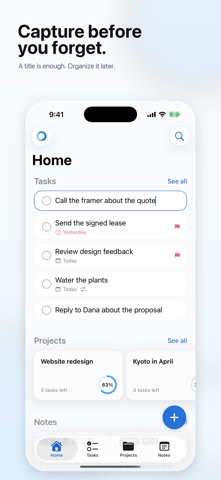
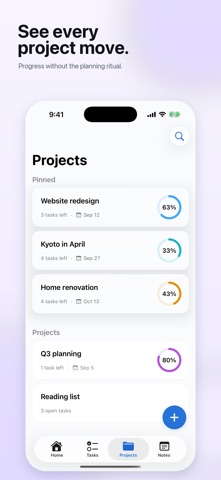
Everything has a place. Organizly is a simple personal organizer for tasks, projects, and notes. Use it as a task manager, a to-do list, a home for notes, or all three. Capture it. Put it somewhere. Move on. Add a task before you forget it. Keep related things together in projects. Save notes you want to find again. Add due dates and reminders when they are useful, or leave them out when they are not. From a quick grocery list to an ongoing personal project, everything stays easy to add and easy to find. ○ Made for Everyday Life Organizly gives work tasks, trips, ideas, wishlists, packing lists, personal projects, and everyday responsibilities a clear place to live. Put something in Organizly, then stop holding it in your head. ○ Simple by Design • Create unlimited tasks, projects, and notes • Add due dates and reminders • Find what you need with search • Keep everything in sync with iCloud • Use Quick Add from the Lock Screen, Control Center, or Action Button • Save text and links from any app with the share sheet • Undo accidental changes ○ More with Organizly+ Organizly+ adds more ways to automate and personalize your experience, with recurring tasks, Home Screen widgets, Siri and Shortcuts, and custom project colors. Choose a monthly or yearly subscription. The core Organizly experience remains free. Payment is charged to your Apple Account at confirmation of purchase. A subscription renews automatically unless it is cancelled at least 24 hours before the end of the current period. Manage or cancel your subscription in your Apple Account settings. Terms of Use: https://organizly.org/terms Privacy Policy: https://organizly.org/privacy Get it out of your head. Put it in its place.
Latest release
What’s New
Everything has a place. Organizly 2.0 is a major update designed to make personal organization feel lighter. • A redesigned experience for iPhone and iPad • A clearer Home for today’s tasks, pinned projects, and notes • Tasks and notes together inside each project • Search across tasks, projects, and note contents • Task reminders and faster ways to capture what matters • More reliable iCloud sync and Organizly v1 importing • Organizly+ with recurring tasks, Home Screen widgets, Siri & Shortcuts, and custom project colors We’ve polished the details throughout so you can capture it, put it somewhere, and move on.
Audience growth
Ratings growth
Baseline captured. Growth appears after the crawler observes a changed rating count.
Momentum comes from crawler snapshots for the tracked storefront. “Viral growth signal” means unusually fast recent rating gains; it is an indicator, not download data.
Price tracking
Price intelligence
First snapshot captured. The trend line starts after the next crawler price observation.
- First observed Sep 13, 2026 · 12:08 AM Free
Screenshots