About this app
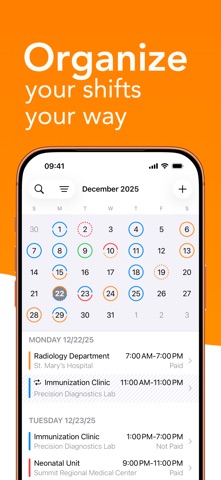
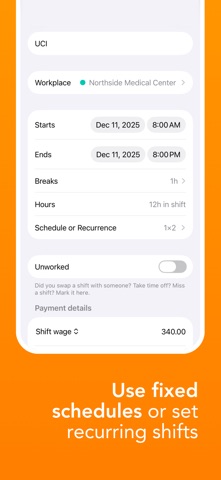
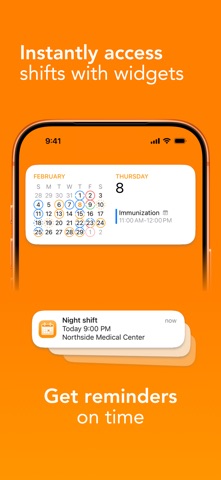
Shift Calendar is a simple and efficient way to manage your work shifts. Organize your schedule with rotations, days off, swaps, and absences, track your earnings, create payout reports, and keep a clear overview of your professional routine, without relying on spreadsheets or manual tracking. Designed for professionals who work in shifts. Why choose Shift Calendar? • Organized schedule: manage your shifts, personal events, swaps, and days off in one place, with full visibility of your work schedule. • Financial clarity: know how much you will earn and when you will get paid, with the option to generate PDF reports for payouts, sharing, or printing. • Time-off planning: avoid surprises and enjoy your rest periods with more peace of mind. • Simple, practical, and intuitive: built to support your daily routine. Main features: • Automatic shift schedules and recurring patterns • Personal events registration • Calendar synchronization • Earnings tracking with amounts, payment dates, and custom payment rules • Custom colors to differentiate shifts • Mark unworked shifts as swaps, days off, or absences • Home screen widgets • Export shift reports to PDF, with filters and multiple formats • Schedule conflict alerts • Secure cloud backup Perfect for professionals like: • Nurses, doctors, EMTs, and caregivers • Firefighters, police, and security guards • Bartenders, restaurant and hotel staff • Drivers, cleaners, and rotating shift workers The app can be used for free. The Pro version offers additional features, with a free trial available before subscribing. ——— Support and Contact: We’re here to help! Contact us via email at: support-shiftcalendar@bivis.app Terms & Conditions and Privacy Policy: https://tenhoplantao.com.br/terms-conditions-and-privacy-policy
Latest release
What’s New
First version released for iOS 27!! We fixed an issue where selecting a color for a shift might not work as expected, displaying a blank screen instead of the iOS color picker. Starting with this version of the app, iOS 16 is no longer supported. If you’re an iOS 16 user, you can still use version 1.6.2 of our app without any issues.
Audience growth
Ratings growth
Baseline captured. Growth appears after the crawler observes a changed rating count.
Momentum comes from crawler snapshots for the tracked storefront. “Viral growth signal” means unusually fast recent rating gains; it is an indicator, not download data.
Price tracking
Price intelligence
- First observed Oct 3, 2026 · 8:01 AM Free
Screenshots