About this app
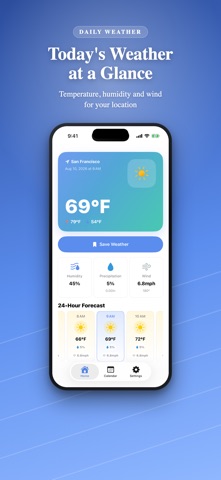
Record today's weather and look back at it on a calendar. Past Weathers is a simple weather app focused on keeping a weather diary. Save today's weather with a single tap, and it stays on your calendar. Perfect for journaling, travel memories, gardening, and school projects. ---------- Key Features ---------- - Today at a glance Current conditions and temperature, daily high/low, humidity, chance of rain, wind speed, and a 24-hour hourly forecast. - One-tap recording Just tap "Register Today's Weather" to save a full day of hourly data. - Look back on a calendar Recorded days appear with weather icons and temperatures. Monthly summary shows recorded days and high/low/average temperatures. See where each record was taken on a map. - Every day, in detail Hourly conditions, temperature, humidity, and wind, plus the place and time of each record. - Fill in the days you missed Pick a day without a record on the calendar to fetch that day's weather. Watch a short video to add one day (August 1, 2021 onward). - Recording reminder A daily notification at a time you choose, so you never forget. - Choose your units Temperature in °C/°F, wind in m/s, km/h or mph, precipitation in mm or inches. - Tidy up your records Saved records can be deleted anytime. ---------- Great for ---------- - Keeping a weather diary - Remembering the weather of trips and special days - Gardening and outdoor activity logs - Record daily, and you can look back at "what was the weather like this time last year?" Weather data is provided by Apple Weather. Available in English, Japanese, French, Korean, German, Spanish, Italian, Chinese (Simplified/Traditional), and Portuguese (Brazil).
Latest release
What’s New
- Fill in past days you forgot to record, right from the calendar (August 1, 2021 onward) - New daily reminder notification at a time you choose - Choose display units for temperature (°C/°F), wind speed, and precipitation - Calendar days now show a weather icon with the high/low temperature - Saved records can now be deleted
Audience growth
Ratings growth
Baseline captured. Growth appears after the crawler observes a changed rating count.
Momentum comes from crawler snapshots for the tracked storefront. “Viral growth signal” means unusually fast recent rating gains; it is an indicator, not download data.
Price tracking
Price intelligence
First snapshot captured. The trend line starts after the next crawler price observation.
- First observed Aug 19, 2026 · 8:46 AM Free
Screenshots