About this app
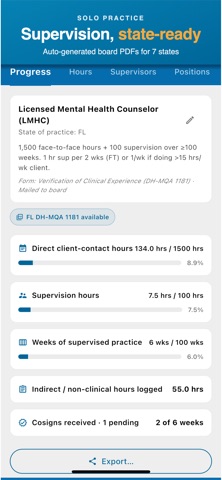
EMRFlow turns clinical documentation from a paperwork tax into a 60-second wrap-up after each session. Connect it to any HL7 FHIR R4 EHR via SMART on FHIR and your patients, forms, and codes stay in sync with the system your practice already runs. No FHIR server? Use it standalone in Solo Practice Mode: notes, scheduling, billing, and telehealth in one app. Built for licensed therapists working under billing companies that handle their claims, and for solo practices that want one tool instead of five. WHAT YOU GET Each feature is tagged with where it runs: Group Practice, Solo Practice, or both. • Voice dictation for post-session notes. Tap, talk for 2 to 5 minutes, get back a structured SOAP note ready to review and sign. (Group Practice and Solo) • Field-level AI assist. AI fills the structured fields of your form, not a wall of text, and every AI draft goes through your review before it's signed. (Group Practice and Solo) • Smart form filling. ICD-10 codes, CPT codes, supervisor co-signatures, treatment plans, attendance logs. The fields know each other. (Group Practice and Solo) • Scheduling with patient self-booking. A public booking widget you embed on your site lets prospects pick from your available slots. (Solo Practice) • Telehealth video visits. One tap to start a HIPAA-aligned video visit with the patient; they join from a link, no app download required. (Solo Practice) • Patient portal with magic-link access. Patients see appointments and join video calls without creating an account. (Solo Practice) • Claims submission and ERA posting. Submit claims to your clearinghouse, track status, and post 835 remittances back to the encounter automatically. (Solo Practice) • Supervision logs for clinicians under licensure hours. Generates state-board PDFs for FL, CA, NY, TX, PA, IL, OH. (Solo Practice) WORKS OFFLINE • Full access to your synced patients, forms, and codes without internet. • Create and edit forms offline; they sync automatically when you reconnect. • No interruption during home visits or facility rounds. SOLO PRACTICE MODE TIERS EMRFlow Solo Practice has Starter, Standard, Pro, and Growth tiers. Available features vary by tier: scheduling, voice dictation, telehealth, claims submission, the client portal, advanced analytics, supervision logs, and the public booking widget. WHO IT'S FOR • Therapists at IDD, rehabilitation, and outpatient therapy practices whose billing company already uses EMRFlow. • Solo therapists who outgrew spreadsheets and want one tool for notes, scheduling, and billing. • Practice managers and billing staff who need to assign caseloads, audit notes, and pull supervision logs. SECURITY AND COMPLIANCE EMRFlow is built on an ONC HIT 2015 Edition Certified EHR foundation with native HL7 FHIR R4 and SMART on FHIR 2.0 support. Operated under HIPAA Security Rule safeguards with Business Associate Agreements in place across all subprocessors handling protected health information. • TLS 1.2+ in transit, AES-256 at rest • Hardware-backed device attestation with Firebase App Check on every install • Architected for the CMS-0057-F payer interoperability mandate effective January 2027 ABOUT THE COMPANY EMRFlow is built by Facets Novum LLC, a US-based team focused on outpatient therapy documentation. We sign BAAs downstream with every practice we serve. Privacy policy: https://emrflow.com/privacy Support: helpdesk.emrflow.com Web: https://emrflow.com
Latest release
What’s New
• Comment notifications: get notified when a teammate comments on a form, with unread badges on the form list and the app icon. Tap to jump straight to the conversation. • A simpler sign in screen with three clear tabs: Your EHR, Solo Practice, and Demo. • Smarter procedure codes: untimed codes no longer ask for a duration, and you record the actual session start and end times. • Attendance logs prefill your usual site staff details, and dropdown lists are sorted the way you expect. • Faster code catalog updates plus many scrolling and reliability fixes.
Audience growth
Ratings growth
Baseline captured. Growth appears after the crawler observes a changed rating count.
Momentum comes from crawler snapshots for the tracked storefront. “Viral growth signal” means unusually fast recent rating gains; it is an indicator, not download data.
Price tracking
Price intelligence
First snapshot captured. The trend line starts after the next crawler price observation.
- First observed Aug 19, 2026 · 6:30 AM Free
Screenshots