About this app
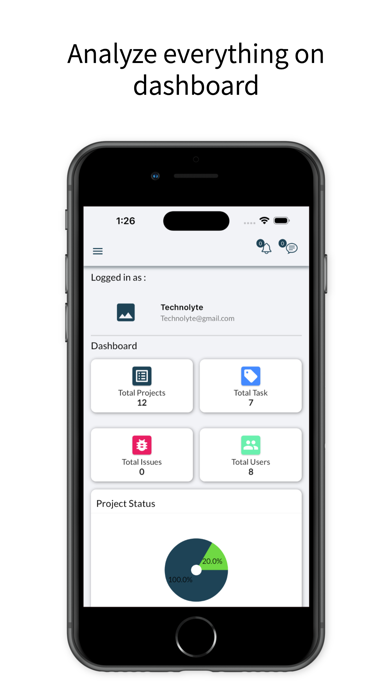
Efficient Dashboard Get an overview of the total number of projects, tasks, bugs, and members. A visual representation of the task overview and project status can help you estimate the progress on each task. Lastly, you can check the top due task. Multi Workspace Create multiple workspaces for different projects. You can create an individual workspace or shared workspace by inviting other users. Project Management Create new projects and assign teams to each project. Add multiple members to share the projects with clients. You can edit permissions and controls to manage client access. Set a budget and create milestones for projects. Attach cost and summary to milestones and change the status through the drop-down menu. Get a tab on recent activities of a project and also a graph about progress. Along with that, you can check your tasks’ details under project details with the help of the Gantt Chart. Taskboard Add a new task to an already existing project and prioritize them according to the need of urgency. Assign the task to team members and set a due date for task completion. Add comments to the task and create a sub-task for ease of completion. Attach necessary files in a required task. Notes have a sharing option While creating any of the important notes, one can keep them personally as well as assign or share them with the concerned person. Multi-User Access Invite users and give them access to various projects and workspaces. A user tab will give brief information on the projects and tasks of each user. You could always add a new user and remove an unnecessary user as and when required. Chat You can chat with users on important project aspects without leaving the tool workspace-wise. Personalize your notes Create your personalized notes so that nothing remains forgotten. In the daily ups and downs of business, some things might run out of your mind. Keep a tab on those activities by maintaining notes. Also, you could prioritize the notes based on their urgency.
Latest release
What’s New
bugs fixing, Ui enhancement.
Audience growth
Ratings growth
Baseline captured. Growth appears after the crawler observes a changed rating count.
Momentum comes from crawler snapshots for the tracked storefront. “Viral growth signal” means unusually fast recent rating gains; it is an indicator, not download data.
Price tracking
Price intelligence
First snapshot captured. The trend line starts after the next crawler price observation.
- First observed Sep 4, 2026 · 6:00 AM Free
Screenshots