About this app
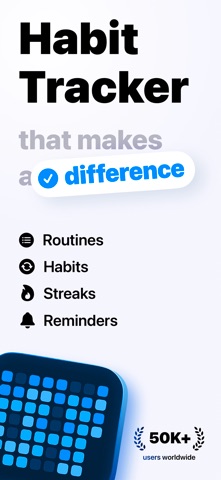
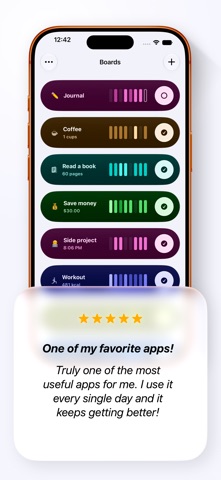
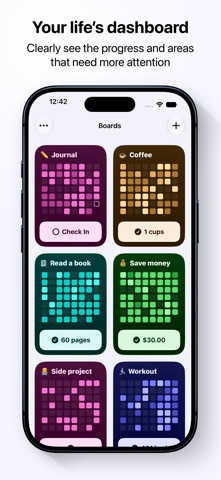
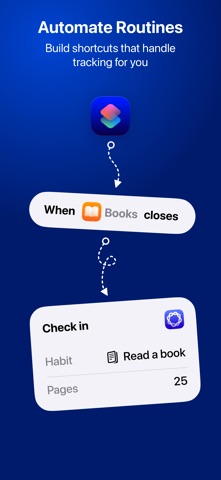
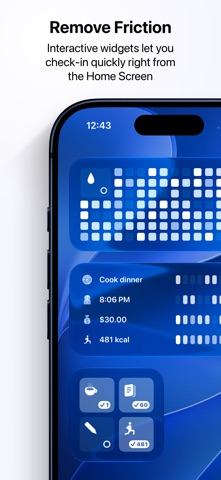
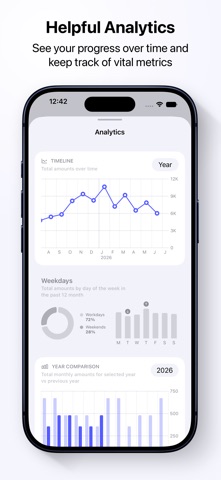
Ripples is an app that can help you make new habits stick and be more consistent with any goal you're working towards. It provides an easy way to check in on the actions you're tracking and then displays your progress in a calendar grid, making it easy to see patterns and potential areas for improvement. CALENDAR GRID It gives you a bird's-eye view of your progress, it's purely visual and intuitive. Each cell of the grid changes color depending on your activity on a specific day. It tracks either the number of times you check in or a specific amount (time, distance, calories, money, etc.) depending on your preference. Cells with higher values become more prominent. Over time you'll be able to see patterns on the grid: days when you're making a lot of progress and days when you're falling behind. This gives you data to adjust things in real life and improve. VITAL METRICS AND ANALYTICS For every tracked action, you can see metrics like the current and best streak, consistency score and your overall progress for a given day, week, month and year. And if you want to dive even deeper into stats, there are multiple charts and visualizations of your data that give a historical overview of the progress. TRACKING AMOUNTS This gives you an option to add a value and a unit to the action you're tracking. For example, you can track how much time you spent on your goal, how much money you saved or spent, or anything that requires distance, mass, calories, etc. And you can also add custom units. All visualizations for actions with amounts will adjust and take into account values that you enter: the grid will highlight cells with larger amounts and breakdown charts will also be amount-based instead of just counting the number of check-ins. REMINDERS For every action you track in Ripples, you can set multiple daily reminders to help you remember and build a habit. You can also set a single review reminder to go back and check in on actions you might have forgotten to track. NOTES AND JOURNAL You can take notes alongside every check-in when hitting important milestones or just highlighting things to look back on. These notes are organized in a dedicated Journal view where you can explore and search all your notes. SHORTCUTS AND SIRI You can integrate Ripples shortcuts into your automation workflows and use Siri phrases to check in on your progress. WIDGETS Interactive Home Screen and Control Center widgets keep important goals always in sight and let you check in without even opening the app. The widget shows the grid, the name of the action you're tracking, as well the time of your last check-in or the current amount value for the day. There are multiple widget styles to choose from to fit the aesthetics of your home screen. PRIVATE BY DESIGN! Habits and goals are some of the most personal and sensitive aspects of people's lives. That's why with Ripples all your data can be seen by you exclusively and leaves your devices only for synchronization via iCloud while being end-to-end encrypted. Privacy is one of the core principles and it goes across every technical or design decision during development. Privacy Policy: https://ripples.day/privacy Terms of Use: https://www.apple.com/legal/internet-services/itunes/dev/stdeula
Latest release
What’s New
- Boards that track amounts now show the latest daily amount and how it relates to the historical minimum and maximum. - Board details now include a set of quick facts, such as the total number of check-ins, tracked days, and minimum and maximum amounts. - New monthly average chart on the board details screen for boards that don’t track amounts. - New daily average chart on the board details screen for boards that track amounts. - Improved French localization (Thank you, Louis Sabiron!) - Fixed an issue where the Yearly Comparison chart sometimes showed incorrect amounts. - Fixed an issue where boards sometimes did not progress to a new day after midnight. - Fixed an issue where Ripples+ features would sometimes become locked while the device was offline.
Audience growth
Ratings growth
Baseline captured. Growth appears after the crawler observes a changed rating count.
Momentum comes from crawler snapshots for the tracked storefront. “Viral growth signal” means unusually fast recent rating gains; it is an indicator, not download data.
Price tracking
Price intelligence
First snapshot captured. The trend line starts after the next crawler price observation.
- First observed Sep 4, 2026 · 7:01 AM Free
Screenshots