About this app
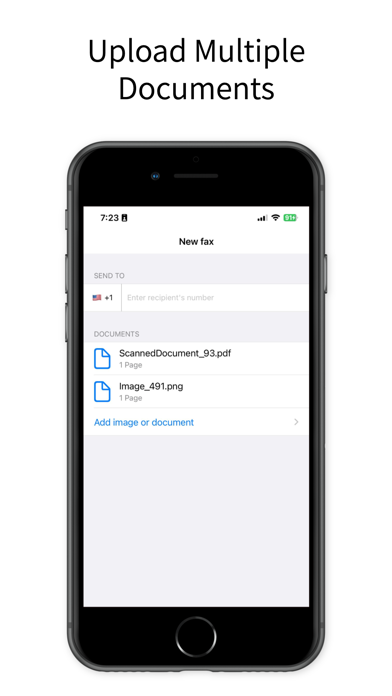
Transform your iPhone and iPad into a powerful fax machine with our cutting-edge Fax app! Send faxes effortlessly and securely from anywhere, anytime. Whether it's a document, photo, or PDF, our app allows you to fax directly from your device without the need for a traditional fax machine. Key Features: • Send Faxes Quickly: Easily send faxes from your iPhone or iPad in a few simple steps. Perfect for business or personal use. • Wide Document Support: Fax various types of documents including PDFs, photos, and Word files. Upload from your device or cloud storage. • Secure & Confidential: Ensure your documents are sent securely with advanced encryption. Protect your sensitive information. • Intuitive Interface: User-friendly design makes sending faxes a breeze. Perfect for all ages and tech skill levels. • Fax History: Keep track of all your sent faxes with our comprehensive fax history feature. Never lose track of your documents. • International Faxing: Send faxes globally to over 90 countries. Stay connected no matter where you are. • Real-time Notifications: Get instant updates on the status of your faxes. Know exactly when your fax has been delivered. Why Choose Our Fax App? • Convenience: Send faxes directly from your iPhone or iPad without needing a fax machine. • Cost-effective: Save money on fax services and eliminate the need for a landline. • Efficiency: Send faxes quickly, helping you stay productive and efficient. • Mobility: Fax on-the-go from your mobile device. Perfect for busy professionals and travellers. How It Works: • Download and install the Fax PDFs - Send Docs on your iPhone or iPad. • Open the app and select the document you want to fax, and pick the subscription plan between Weekly, Monthly & Yearly. • Enter the recipient’s fax number and any additional information. • Hit send and wait for the confirmation notification. Experience the future of faxing with our Fax PDFs - Send Docs. Download now and simplify your faxing needs with the power of your iPhone and iPad! Subscription Information: • Subscription options are: Weekly, Monthly and Yearly. Weekly Plan: Send up to 15 documents per week, Monthly Plan: Send up to 30 documents per month, Yearly Plan: Send up to 360 documents per year. • Your iTunes Account will be charged with the payment after purchase confirmation • Subscription will be automatically renewed at least 24 hours before the end of the current period. Auto-renewal can be manually turned off in the corresponding settings. • User can manage the subscriptions. Auto-renewal can be deactivated in the Account Settings after a successful purchase. Privacy Policy: https://sites.google.com/view/faxfromiphone-ifaxdocs/terms-of-use Terms of Use: https://sites.google.com/view/faxfromiphone-ifaxdocs/privacy-policy Please refer to EULA here: https://www.apple.com/legal/internet-services/itunes/dev/stdeula/ If you have any questions or suggestions, we are always ready to help: wallpapestudio@gmail.com
Latest release
What’s New
- Control Action Support: Quickly send faxes, import files, or scan documents right from your Control Actions! Now, accessing key features is faster and more convenient than ever. - Tinted Icon Support: Enjoy a fresh look with our new tinted icons, designed to seamlessly match your iOS theme. Update now and make faxing even simpler!
Audience growth
Ratings growth
Baseline captured. Growth appears after the crawler observes a changed rating count.
Momentum comes from crawler snapshots for the tracked storefront. “Viral growth signal” means unusually fast recent rating gains; it is an indicator, not download data.
Price tracking
Price intelligence
First snapshot captured. The trend line starts after the next crawler price observation.
- First observed Aug 21, 2026 · 12:44 PM Free
Screenshots