About this app
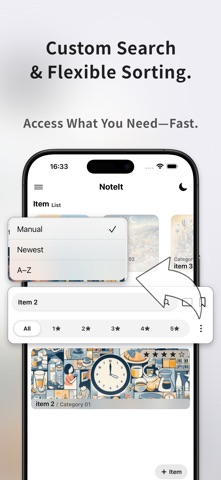
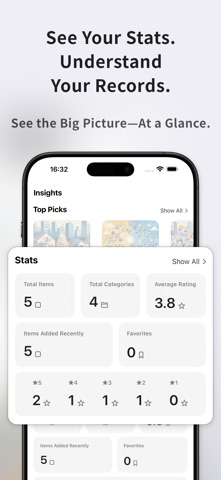
Organize your memories and records—your way, beautifully. NoteIt is a clean and flexible app designed to help you organize your daily notes, thoughts, and personal data—whether it's a quick idea, a favorite place, or a detailed life log. Each entry is fully customizable—combine text, images, ratings, numbers, and links into one rich item. Use categories and tags to stay organized, then filter, search, and sort to instantly find what you need. From hobbies to habits, NoteIt helps you preserve what matters—beautifully and efficiently. □ Key Features ・Create notes with titles, text, images, links, ratings, and numeric fields ・Build custom categories to neatly organize your notes ・Shuffle notes for a fresh look back at past entries ・Browse "Favorites" or view a list of recently updated notes ・Sort by custom order, newest first, or A–Z ・Filter by rating, tag, category, or favorites ・Use the keyword search bar to quickly find any note ・Choose from 4 layout styles for your note list display ・View stats like total notes and average rating ・Supports light & dark mode to suit your environment □ Use Cases ・Save your thoughts and reviews on books, movies, or travel—with photos ・Keep a visual inventory of your collections (magazines, CDs, merch, etc.) ・Track your favorite cafes, restaurants, or recipes ・Log study progress or build a personal habit tracker ・Create memory journals or themed folders for everyday reflections □ Perfect For ・People who want to organize information by category or topic ・Anyone building a personalized log with photos and ratings ・Visual thinkers who want to make sense of their ideas ・Users frustrated with overly complex note or spreadsheet apps ・Anyone looking for a clean, ad-free note-taking experience □ Pricing All core features are free to use. Some advanced features are available via subscription. □ Development Philosophy NoteIt is independently developed with care and a focus on simplicity. Our goal: a note-taking app that’s easy for anyone to use—and enjoyable to keep using. We actively read all feedback and use it to guide future updates and features. Download NoteIt now and start organizing what matters—your way. □ Optional Permissions Camera: To take and attach photos for your entries Photo Library: To upload images from your device Terms of Service (EULA):https://www.apple.com/legal/internet-services/itunes/dev/stdeula/ Privacy Policy:https://lomworks.com/legal/privacy-app
Latest release
What’s New
Thank you for using our app. This update includes the following changes: ・Revisions to the App Store preview images
Audience growth
Ratings growth
Baseline captured. Growth appears after the crawler observes a changed rating count.
Momentum comes from crawler snapshots for the tracked storefront. “Viral growth signal” means unusually fast recent rating gains; it is an indicator, not download data.
Price tracking
Price intelligence
First snapshot captured. The trend line starts after the next crawler price observation.
- First observed Sep 30, 2026 · 8:52 AM Free
Screenshots