About this app
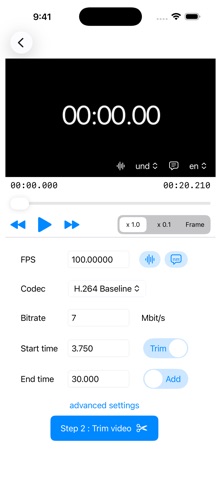
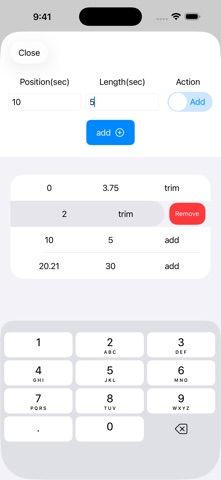
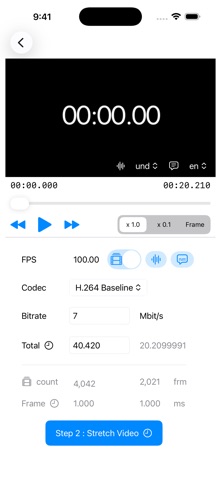
Trim, add frames, or stretch to fit - adjust your video length by the second. Adjust video length effortlessly! This app optimizes your video by trimming or adding frames to match your target time. You can also fine-tune the total duration by adjusting the frame count or the playback time per frame. Important Notes: Stretch Feature: Currently supports video export only (no audio). Precision: Final duration may vary slightly due to internal calculation rounding. Input: Please enter the total duration in seconds. How to trim Step 1 : Select a video file from device (via Files app). Step 2 : Input new video parameter, and trim video! - FPS - Select codec from H.264 or H.265 (HEVC) or ProRes - Select audio & subtitle export - Bitrate(Mbit/s) - input the seconds of trim or add for new video To make more detailed edits, set the time and action on the Advanced page. When using the Stretch feature, please enter the total duration in seconds on the stretch parameter page.
Latest release
What’s New
Subtitle export is now included when exporting from "Stretch Video"! Fixed minor bugs.
Audience growth
Ratings growth
Baseline captured. Growth appears after the crawler observes a changed rating count.
Momentum comes from crawler snapshots for the tracked storefront. “Viral growth signal” means unusually fast recent rating gains; it is an indicator, not download data.
Price tracking
Price intelligence
First snapshot captured. The trend line starts after the next crawler price observation.
- First observed Aug 19, 2026 · 10:15 AM Free
Screenshots