About this app
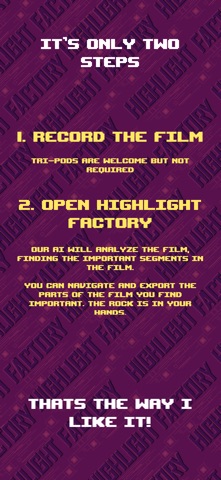
Turn full basketball games into clean, shareable highlight reels in minutes. Highlight Factory scans your game film and automatically find the plays that matter. Instead of scrubbing through an hour of footage looking for a few big moments, the app identifies field goal attempts so you can instantly review the action. Whether it’s a 20-minute pickup run, a 40-minute rec league game, or a 90-minute officiated game, Highlight Factory helps you quickly find the buckets, tag players, and build highlight reels with just a few taps. Because basketball isn’t an hour of highlights — it’s a handful of 7-second moments scattered across an entire game. Highlight Factory finds those moments for you. What Highlight Factory Does • Automatically Detects Field Goal Attempts • Track players and field goal attempt location The AI analyzes your video and identifies shot attempts — both makes and misses. • Create Highlight Reels Instantly Select the plays you want and export them as clips or combine them into a highlight reel. • Tag Players & Generate Stats Assign plays to players and track performance across games. • Save Hours of Film Review Stop scrubbing through long recordings. Jump straight to the key sequences. • Works With Your Existing Footage Import videos directly from your camera roll or files. How It Works 1. Record Your Game Film using your phone or any camera. The camera can remain stationary or follow the action. 2. Import the Video Bring the footage into Highlight Factory from the Files app or your Photos library. If the camera is stationary, the app will ask you to identify the basket to track. 3. Let the AI Process the Game The AI scans the footage and finds shot attempts throughout the game. 4. Review, Tag & Export Tag plays to players, export clips, and generate highlight reels in seconds. Perfect For • Pickup runs • Rec leagues • Amateur teams • Player development • Personal highlight reels
Latest release
What’s New
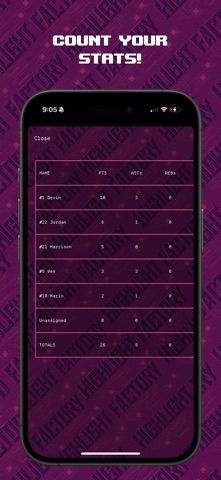
Happy to present the biggest release yet of the Highlight Factory. In this version, a second processing pass has been introduced allowing you the user to identify players in the video. The app will then process the video and find who and where the field goal was attempted! Yes, let’s say that again, we’ve added player and shot tracking! On the stats screen, you can visualize the makes and misses on the court. Players will also be identified in the player too.
Audience growth
Ratings growth
Baseline captured. Growth appears after the crawler observes a changed rating count.
Momentum comes from crawler snapshots for the tracked storefront. “Viral growth signal” means unusually fast recent rating gains; it is an indicator, not download data.
Price tracking
Price intelligence
First snapshot captured. The trend line starts after the next crawler price observation.
- First observed Aug 7, 2026 · 10:02 PM Free
Screenshots