About this app
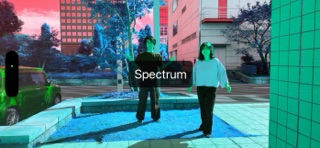
Ugokist (motion-aware person) is a real-time effects processor for camera footage. It processes the image based on the amount of movement captured by the camera, dramatically changing the image. The following effects are available: - Flip - Brightness - Scale - Afterimage - Delay - Mosaic - Rotation - Glitch - Puase - Edge - Scratch - Spectrum - Mirror - Strip - Kaleidoscope The following settings are available: - Camera: Specifies the camera to use - Zoom: Camera zoom ratio - Effect: Selects the video effect - Automatic Zoom/Effect: Automatically changes the zoom ratio and video effect - Settings Button: Displays the settings button - Uncharging Warning: Displays a warning when the device is not charging The following information is displayed: - Motion: The amount of change in the camera image - FPS: Video frame rate Tips - On iPad, full screen viewing is recommended. - Double-tap or long-press the screen to open the settings. - You can save the displayed image as a movie using the OS's standard screen recording. - You can display the screen or project it using the OS's standard AirPlay. - To use full-screen display on iPadOS 26 or later, select the full-screen app in "Multitasking & Gestures" in the Settings app.
Latest release
What’s New
• Smoother capture: the camera now runs at 60fps. • Redesigned Glitch effect with an analog feel — horizontal smearing, ghosting, dropout streaks and torn scan lines that build up as motion increases. • Drag on the video to add motion by hand, so the effects can respond even when the subject is still. • Double-tap the video to randomize the effect and zoom. • Redesigned Settings, organized into clearer sections. • Light/Dark Mode support. • Fixed an issue where the effect shown in Settings was not applied when the app launched.
Audience growth
Ratings growth
Baseline captured. Growth appears after the crawler observes a changed rating count.
Momentum comes from crawler snapshots for the tracked storefront. “Viral growth signal” means unusually fast recent rating gains; it is an indicator, not download data.
Price tracking
Price intelligence
First snapshot captured. The trend line starts after the next crawler price observation.
- First observed Aug 26, 2026 · 5:28 PM Free
Screenshots