About this app
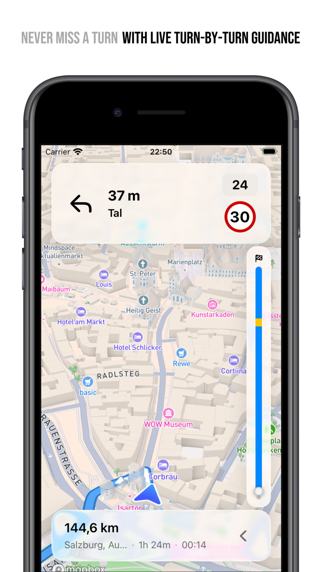
PLAN MULTI-STOP ROAD TRIPS WITH EASE Ready for iOS 26 with stunning liquid glass design! Create perfect road trip itineraries with local AI assistance and enhanced sharing. Fernweh transforms scattered travel inspiration into organized adventures. Perfect for cross-country trips, European tours, or any multi-stop journey. KEY FEATURES: • NEW: Turn-by-turn navigation - live guidance with CarPlay support, EV charging stops along your route, and dimension-aware routing that avoids low bridges and weight limits for oversized vehicles • NEW: AI Trip Assistant - describe your journey, get instant trip foundations (runs locally on device) • NEW: Smart sharing extension - extracts locations from any shared content • Find EV charging stations with detailed charger info and pricing • Filter POI searches by category (restaurants, gas stations, hotels, more) • Smart search tokens for quick trip filtering on home screen • Calculate trip costs based on your vehicle's fuel efficiency and your average fuel cost • Configure multiple vehicles with different fuel consumption profiles • Plan trips forward or backward in time • Plan trips with as many stops as your route needs • Automatic date calculations for each destination • Interactive route mapping with enhanced trip overview • Customizable stay duration at each location • Real-time travel time estimates • Invite friends and family to plan trips together • Export trips in various formats (PDF, GPX, KML, CSV, JSON, Markdown) PERFECT FOR: • Road trip enthusiasts • Multi-city travelers • Weekend getaways • Cross-country adventures • European tours • Family vacations • Digital nomads POWERFUL LOCATION MANAGEMENT • Search places worldwide • Tap-to-add locations on the map • Import from Apple Maps • Rich location details (address, phone, website) • Drag & drop route optimization • Visual journey overview with smart markers SEAMLESS APPLE ECOSYSTEM INTEGRATION • iCloud sync across iPhone and iPad • Turn-by-turn navigation built into CarPlay - no hand-off to another app • Siri & Apple Shortcuts integration • Share extension for quick location adding WHY TRAVELERS CHOOSE FERNWEH: • Stunning liquid glass design with fluid, translucent interfaces • Intuitive interface designed for complex trips • Privacy-focused - your data stays yours, AI runs locally • No 3rd-party tracking Download Fernweh now and start planning your next road trip. #RoadTrip #TravelPlanning #Adventure Terms of Use: https://www.apple.com/legal/internet-services/itunes/dev/stdeula/ Privacy Policy: https://davidmoeller.me/apps/fernweh/privacy
Latest release
What’s New
What's New in Version 1.23.0: NEW: • Find Places by Category — Pick a category — food, fuel, campsites, viewpoints — and Fernweh searches the part of the map you are looking at. Move the map and search again, or clear the results without touching your saved places. • Chargers on the Driving Map — Every charger ahead on your route now shows as a pin while you drive, on iPhone and in CarPlay. Its colour tells you whether a connector is free, occupied, or simply not reported. • Share a Place from Any Maps App — Sharing a place into Fernweh now works from Google Maps and other map apps, not only Apple Maps. When a link cannot be used, Fernweh tells you why instead of showing a generic error. • Skip a Stop Mid-Drive — Drive past a stop and Fernweh asks whether to keep it or skip it, then re-plans around your answer. Starting a day part-way along now drives on right away and offers the stops you passed back. • CarPlay Knows Where You Are Headed — The CarPlay capsule now names your next destination and when you will arrive, with the end-of-route arrival alongside it when there is room. Every arrival time is adjusted to the pace you actually drive. • Filter What's on the Trip Map — Hide saved places, chargers or stops on a trip's map so you only see what you're working on right now. IMPROVED: • The map's own controls sit together in one place, and a search on the map tells you how many places it found. • A control on the map brings every stop back into view after you've panned away. • Map pins are no longer grouped into clusters — every stop and saved place is shown individually. • A stop you've pinned an arrival time to now shows the slack you have, instead of a warning. • With the sheet pulled down, its title now names the screen you're on. • CarPlay's own arrival time now follows your driving pace. FIXED: • Every text field can now dismiss the keyboard — including multi-line notes and number pads. • Pins from a place search now open their details with a tap. • Charger detour times, availability freshness and distances are corrected and properly localized. • The departure stop's address now wraps onto a second line like every other row, instead of being cut off.
Audience growth
Ratings growth
Baseline captured. Growth appears after the crawler observes a changed rating count.
Momentum comes from crawler snapshots for the tracked storefront. “Viral growth signal” means unusually fast recent rating gains; it is an indicator, not download data.
Price tracking
Price intelligence
First snapshot captured. The trend line starts after the next crawler price observation.
- First observed Sep 2, 2026 · 2:44 AM Free
Screenshots