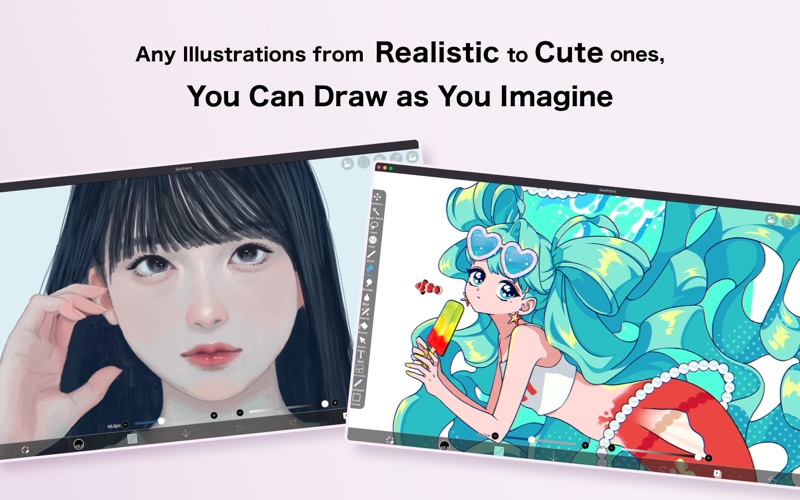
About this app
ibis Paint is a popular and versatile drawing app downloaded more than 500 million times in total as a series, which provides over 105,000 brushes, over 29,000 materials, over 3,000 fonts, 84 filters, 46 screentones, 27 blending modes, recording drawing processes, stroke stabilization feature, various ruler features such as radial line rulers or symmetry rulers, and clipping mask features. *YouTube channel Many tutorial videos on ibis Paint are uploaded to our YouTube channel. Subscribe it! https://youtube.com/ibisPaint *Concept/Features - Smooth and comfortable drawing experience realized by OpenGL technology. - Recording your drawing process as a video. - SNS feature where you can learn drawing techniques from other users' drawing process videos. *Features ibis Paint has high functionality as a drawing app along with features of sharing drawing processes with other users. [Brush Features] - Brushes with fluid strokes that glide effortlessly. - Over 105,000 kinds of brushes including dip pens, felt tip pens, digital pens, air brushes, fan brushes, flat brushes, pencils, oil brushes, charcoal brushes, crayons and stamps. - Various brush parameters such as starting/ending thickness, starting/ending opacity, and initial/final brush angle. - Quick sliders that allow you to quickly adjust brush thickness and opacity. - Real time brush previews. - Original brush patterns [Layer Features] - You can add layers as many as you need with no limit. - Layer parameters that can be set to each layers individually such as layer opacity, alpha blending, adding, subtracting, and multiplying. - A handy clipping feature for clipping images, etc. - Various layer commands such as layer duplication, import from the photo library, horizontal inversion, vertical inversion, layer rotation, layer moving, and zooming in/out. - A feature for setting layer names to distinguish different layers. - Adjustment Layers that let you modify filter effects at any time [Manga Features] - Advanced text tool function featuring Vertical, Horizontal, Stroke, Font select, and Multiple text functions. - 46 screen tone functions such as Dot, Noise, Horizontal, Vertical, Slash, Cross, Square, etc. *Purchase plans for ibis Paint ibis Paint for Mac is a free download app. Immediately after downloading, the app is in free mode and there is a one-hour daily time limit for editing your artwork. By purchasing Pro Upgrade within the app, the one-hour daily limit will be removed. Also, if you purchase Pro Upgrade, you will receive benefits such as pro filters. If you purchase a "Premium Membership", you will be able to use all of ibisPaint's functions in addition to the removal of one hour limit per day. [Premium Membership] Premium features are available to Premium Members. A free trial is available for the first 7 days for monthly plans, and for the first 1 month for annual plans. As a Premium Member, you will receive the following services: - 20GB of cloud storage capacity - Advanced vector features (*1) - Advanced Shape Tools (*1) - Premium Materials - Premium Canvas Papers - AI Disturbance - Premium Fonts - Premium filter - Pro filter(*1) - Pro Adjustment Layers(*1) - Surrounding Fill・Surrounding Eraser(*1) - Artwork folder feature(*1) - Import original brush patterns(*1) - Remove watermark from videos(*1) - Plus many other features exclusive to Premium Membership! (*1) Also available with purchase of the Pro Upgrade. * The free trial period for “Premium Membership features” in the Mac version is 7 days for monthly plans and 1 month for annual plans. If you do not cancel automatic renewal at least two days before the end of the free trial period, you will be charged for automatic renewal. * We will add premium features in future, please look out for them. *Questions and support Questions and bug reports in reviews will not be responded to, so please contact ibis Paint support. https://ssl.ibis.ne.jp/en/support/Entry?svid=25
Latest release
What’s New
Thank you for using ibisPaint! The summary of this update is as follows. [New Features] - Added a feature to protect artworks using Yuify. [New Features in ver. 14.0.6] - You can now install brushes from the install button on ibispaint.com brush pattern artwork pages, even when the page is opened in an external browser. [New Features in ver. 14.0.0] - You can now create and name multiple color palettes for easier management. - Added a feature to share color palettes via QR code. - Brushes in the "Basic" tab of the Brush window are now organized by category. - Added support for selecting CMYK colors when saving artwork as a JPEG or flattened layer PSD file. - Added support for selecting grayscale (8bit) color space when saving artwork as a PNG or JPEG file. - Added support for selecting binary (1bit) color space when saving artwork as an opaque PNG file. - Added "Speech Bubble" to the Shape tool. - Added "Thin Arrow" to the Shape tool. - You can now adjust the position, shape, and other properties of a shape before finalizing it in the Shape tool. - Added an "Anti-aliasing" option available when "Fill" is enabled in the Shape Tool. When turned on, it smooths the edges of the filled area. - Added "Draw Line by Brush" to the Shape tool settings. - Added new special pens: “Parallel Gradation Pen” and “Concentric Gradation Pen”. - Added knobs to move the start and end points of the gradation in “Parallel Gradation” and "Concentric Gradation". - Added "Transparent-Current Color" to preset of gradation slider. - Added new parameter “Extension Method” to “Parallel Gradation” and "Concentric Gradation”. - Added the floating view of the Color window. - Added a graph to the "Dynamic" tab of each brush setting to customize the response of size and opacity to pen pressure. - Added a Brush Lock feature. You can access it via the lock icon located in the top-right corner of each brush's settings screen. - Added the Brush Cursor feature. When using a stylus with hover support, you can now display the brush pattern on the screen while hovering. To enable this, go to the "Stylus" section in the Settings window and select "Brush Pattern" under "Brush Cursor while Hovering." - Added "Lasso Selection" feature to the Vector tool, Text tool, and Frame Divider tool. - Some filters in the "Art," "Pixelate," and "Transform" categories can now be used as adjustment layers. - Significantly expanded keyboard shortcuts. Press "Shift + /" to view the list and customize assignments. - You can now import files into ibisPaint by dragging and dropping them. Additionally, when you drop a PNG or JPEG file onto the Canvas screen, it is added as a layer, and when you drop font files, they are added to the Font List in the Text tool. - Added a Layer Lock feature. You can toggle the lock via the menu accessed through the "⋮" button in the Layer window.
Audience growth
Ratings growth
Baseline captured. Growth appears after the crawler observes a changed rating count.
Momentum comes from crawler snapshots for the tracked storefront. “Viral growth signal” means unusually fast recent rating gains; it is an indicator, not download data.
Price tracking
Price intelligence
First snapshot captured. The trend line starts after the next crawler price observation.
- First observed Aug 9, 2026 · 8:27 PM Free
Screenshots