About this app
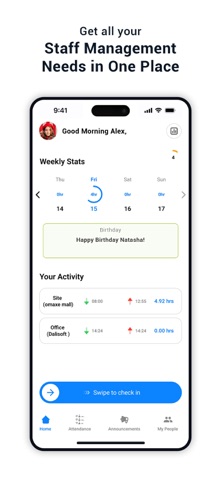
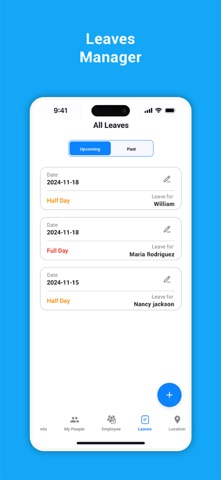
AMS: Smarter Attendance Management AMS is a comprehensive Attendance Management System designed to enhance productivity, streamline attendance tracking, and promote punctuality across organizations. Whether you’re working remotely, on-site, or at the office, AMS ensures your workday starts right with smart, seamless, and secure features. Key Features: 1. Smart Check-In and Check-Out • Simplified Time Tracking: Check in and out with ease, whether you’re working on-site, from home, or at an office branch. • Proximity-Based Authentication: Ensures secure and accurate tracking without compromising privacy. • Error-Free Logging: Notify your admin of missed or fraudulent check-ins to maintain transparency and punctuality. 2. Leave Management • Simplified leave applications. Admins can add half-day or full-day leaves for employees with clarity and precision. 3. Announcements • Stay informed with categorized announcements: • Important: Urgent updates for everyone in your organization. Example: “Server maintenance scheduled for tomorrow from 9 AM to 12 PM.” • General: Keep up with company-wide news. Example: “Welcome our new teammate, John Doe, joining the Marketing team.” • Event Highlights: Celebrate milestones, birthdays, and achievements. Example: “Happy Birthday to Jane from HR!” 4. Attendance Overview • Weekly Dashboard: Quickly view attendance stats, including worked hours and activities. • Detailed Logs: Access a daily breakdown of your work schedule and task activity. 5. My People – Status Sharing • Foster collaboration by sharing your status (Online or Offline) with approved employees. • Privacy-first approach ensures only authorized teammates can see your availability. 6. Branch and Client Site Management • Seamlessly manage office branches and client sites. • Mark locations as Active or Inactive for better control and visibility. 7. Employee Management • A dedicated portal to streamline employee data for seamless workforce management. 8. Monthly Attendance Reports & Analytics • Download comprehensive monthly attendance reports. • Use built-in analytics tools for insights into employee performance, attendance patterns, and punctuality. 9. Dual Admin and Employee Modes • Admin Mode: Empower leaders to oversee attendance, leaves, and announcements effortlessly. • Employee Mode: A user-friendly interface for employees to manage their tasks and schedules. Why Choose AMS? • Encourages transparency and punctuality in your organization. • Bridges the gap between employees and management for better productivity. • Ideal for modern workplaces with remote, on-site, and hybrid teams. Take the first step toward a smarter workplace. Download AMS now and redefine productivity!
Latest release
What’s New
Bug Fixes And Enhancement
Audience growth
Ratings growth
Baseline captured. Growth appears after the crawler observes a changed rating count.
Momentum comes from crawler snapshots for the tracked storefront. “Viral growth signal” means unusually fast recent rating gains; it is an indicator, not download data.
Price tracking
Price intelligence
First snapshot captured. The trend line starts after the next crawler price observation.
- First observed Aug 20, 2026 · 3:20 AM Free
Screenshots