About this app
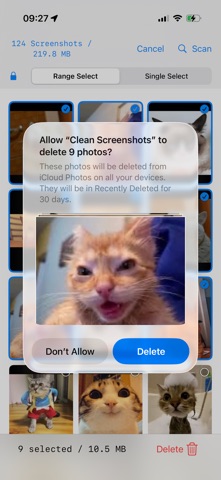
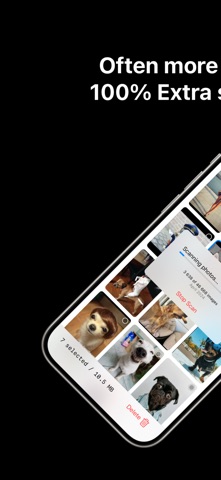
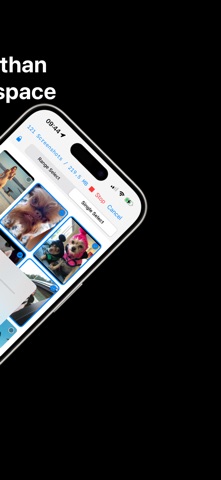
Want twice the space for your photos? A handful of screenshots from Snapchat, Facebook, or websites can secretly steal massive storage. Each screenshot takes up to 900x more space than a regular photo (5.1 MB vs 54 KB). Clean Phone Screenshot Storage finds these space hogs and lets you decide what to keep, archive, or delete. WHAT IT DOES The app intelligently scans your photo library, separates screenshots from real photos, and gives you full control over each one. KEY FEATURES • Smart detection - automatically finds every screenshot in your library • Batch selection - select many at once with range selection and a locked toolbar • Storage insight - see exactly how much space you can save • On-device processing - no images leave your phone for analysis • Preview and zoom - pinch to zoom and review before any action • Recently Deleted recovery - deleted items stay in Photos for 30 days APP LIBRARY WITH ICLOUD SYNC Not every screenshot is worth keeping in Photos, but some you want to find again. Move them to the in-app Library to keep them organized without cluttering Photos. • Move to Library archives a screenshot in the app and frees space in Photos • Move to Phone exports any archived screenshot back to Photos • Library syncs through iCloud so it follows you to a new device • View and zoom archived screenshots full screen • All actions confirm before doing anything destructive KEEP MARK PROTECTION Mark important screenshots as Kept and they stay safe from any batch operation. Useful for receipts, important messages, or anything you cannot risk losing. • Lock icon shows which items are protected • Batch Delete and Move automatically skip Kept items • Confirmation dialogs always tell you the count of Kept items being protected • Remove the Keep mark on individual items or in batch when you change your mind AUTO-DELETE FOR LATER CLEANUP Decide once, forget about it. Set an item to auto-delete after 1 month, 3 months, 6 months, or 1 year. The app handles cleanup in the background. • Per-item or default-for-all in App Library Settings • Auto-delete sweeps run when the app refreshes in the background • Items pass through Recently Deleted in Photos for 30 days as a safety net REAL STORAGE IMPACT • Just 10 screenshots can equal storage space for 9,000 photos • Each screenshot can be up to 900x larger than a normal photo • Most users double their photo storage by removing a few dozen screenshots • One quick cleanup can make room for hundreds more memories COMMON STORAGE-HOGGING SCREENSHOTS • Snapchat conversations and stories • Facebook posts and comments • Instagram stories and DMs • Website articles and content • Twitter and X threads • TikTok videos • WhatsApp chats • Online receipts PERFECT FOR • Anyone who takes occasional screenshots but wants more photo space • Social media users who save posts to read later • People who want to free up space for new memories • Anyone shocked by how much space screenshots actually waste PRIVACY All screenshot detection happens on your device. No images are uploaded to any server for analysis. The optional in-app Library syncs only to your private iCloud database, which only you can read. IN-APP PURCHASES The app is free to use during a 14-day trial. After that, batch Move stays available with one of these options: • Fast Move for under 100 screenshots • Fast Move for 100 or more screenshots • One-time purchase for unlimited use Single screenshot actions, viewing, deletion, and the App Library remain available even after the trial. A NOTE ON RECOVERY Deleted screenshots can be recovered from the Recently Deleted album in Photos for 30 days. Items removed from the App Library are removed from iCloud and cannot be recovered. Download now and turn wasted screenshot space into room for twice as many memories.
Latest release
What’s New
NEW • App Library tab - archive screenshots in the app, synced through iCloud • Move to Library and Move to Phone - flow screenshots between Photos and the in-app Library both ways • Keep mark - lock a screenshot so batch Delete and Move skip it • Auto-delete - set 1 month, 3 months, 6 months, or 1 year per item, or apply a default to the whole library • Pinch to zoom in the full-screen preview • Library Settings with subscription status, default auto-delete, duplicate cleanup, and apply-to-all IMPROVED • Batch Delete and Move now use a single Photos confirmation instead of one per item • Move shows progress, time remaining, and a Cancel button mid-flight • Long-press menu adapts to context - single-item options when nothing is selected, batch options when items are selected • Better handling of items that are already missing from Photos
Audience growth
Ratings growth
Baseline captured. Growth appears after the crawler observes a changed rating count.
Momentum comes from crawler snapshots for the tracked storefront. “Viral growth signal” means unusually fast recent rating gains; it is an indicator, not download data.
Price tracking
Price intelligence
First snapshot captured. The trend line starts after the next crawler price observation.
- First observed Aug 23, 2026 · 5:07 AM Free
Screenshots