About this app
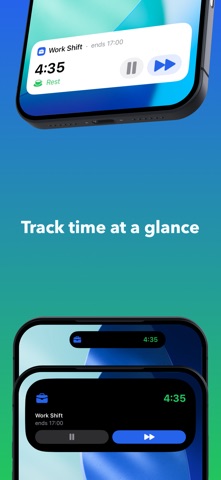
Pokus is the interval timer that keeps reminding you until you actually take your break. Set your focus and rest cycles, and Pokus will persistently alert you when it's time to stop — no more pushing through when you should rest. Dismiss a notification? Another one comes. Still going? It keeps reminding you. Pokus stays on your lock screen and Dynamic Island so you can't pretend you didn't see it. PERSISTENT REMINDERS THAT WORK - Alerts repeat until you respond — not just once - Live Activity on your lock screen — always visible - Dynamic Island shows time remaining - Can't dismiss, can't ignore, can't forget ACTIVITY PACING & ENERGY MANAGEMENT - Structure activity and rest to stay within your energy envelope - Prevent post-exertional malaise with timed rest periods - Ideal for ME/CFS, Long COVID, fibromyalgia, and chronic pain - Gentle but persistent — no more boom and bust cycles SCREEN BREAKS & EYE CARE - 20-20-20 rule for eye strain prevention - Ergonomic break reminders for desk workers - Microbreak intervals for long screen sessions BUILT FOR TIME BLINDNESS - Nagging reminders you genuinely cannot ignore - Simple interface — no complex planning, just start - Visual and haptic cues that cut through hyperfocus - Brain fog friendly ALWAYS IN VIEW - Lock screen widget stays visible - Dynamic Island countdown - Apple Watch support - No need to open the app FLEXIBLE INTERVALS - Classic 25/5 or fully custom cycles - Any focus and rest duration you want - Session time limits to prevent overwork - One tap to start your break SET GOALS & STAY ON TRACK - Set weekly or monthly time targets for any timer or tag - Track minimum, maximum, or range-based goals - Get warned before starting a session that would exceed a limit - See daily progress with charts and pace indicators ORGANIZE WITH TAGS - Group timers with color-coded tags - Link goals to tags for automatic tracking across timers - Filter sessions and analytics by tag TRACK YOUR PATTERNS - Visual charts of focus vs rest time - Daily, weekly, monthly insights - See your productivity rhythms and goal progress - Filter by specific timers or tags SYNCED EVERYWHERE - iCloud sync across devices - Custom timer icons and colors - Unlimited timers and tags - Automatic session history Perfect for: - Anyone with a chronic illness who needs activity pacing - People with ADHD and time blindness - Remote workers who skip breaks - Students in long study sessions - Desk workers needing ergonomic reminders - Anyone who dismisses regular alarms Try free, then unlock unlimited with a one-time purchase.
Latest release
What’s New
Pokus 2.1.1 — Stability fixes across iPhone, Apple Watch, and Live Activities. - Updating the app no longer disrupts your running session - Fixed duplicate or stuck Live Activities on sessions longer than 8 hours - Apple Watch commands no longer get lost while your iPhone is out of reach - Fixed reminders that could silently go missing during long sessions - Fixed a snooze button that could freeze and a weekly chart that skipped a week - Fixed rare crashes when starting a session and when tapping notification actions
Audience growth
Ratings growth
Baseline captured. Growth appears after the crawler observes a changed rating count.
Momentum comes from crawler snapshots for the tracked storefront. “Viral growth signal” means unusually fast recent rating gains; it is an indicator, not download data.
Price tracking
Price intelligence
First snapshot captured. The trend line starts after the next crawler price observation.
- First observed Aug 21, 2026 · 12:33 PM Free
Screenshots