About this app
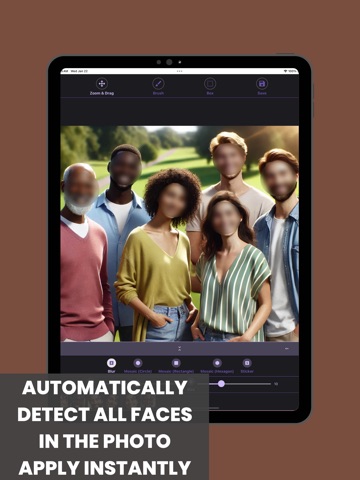
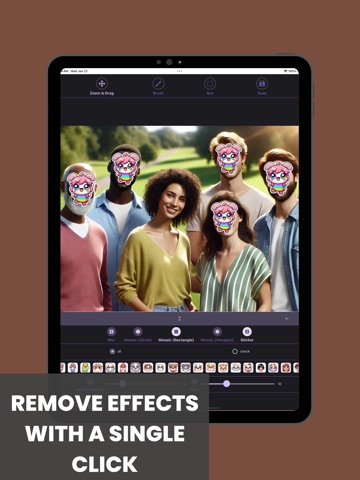
Blur & Mosaic - Auto Face is a convenient photo editing app that immediately detects faces when you load a picture and automatically applies a blur or mosaic effect. Safeguard your personal information by applying a blur effect to specific areas or choosing from various mosaic styles (circular, square, hexagonal, etc.), and easily share your edited images on social media! Main Features 1. Auto Blur & Mosaic - AI face recognition automatically applies blur or mosaic as soon as a photo is loaded 2. Variety of Effects - Blur, mosaic (circular, square, hexagonal), and sticker effects are all supported 3. Manual Blur & Editing - Use the brush or rectangular tool to selectively apply blur or mosaic - Zoom in and out for precise editing 4. Undo Function - Revert any edits with ease if you make a mistake 5. Photo Sharing - Easily share your blurred or mosaic-processed photos from the history page to social media Recommended For - Anyone who wants to hide faces or personal information on photos before uploading to social media - Those who need to conceal a car license plate or sensitive details in a secondhand marketplace listing - Users looking for a fast and easy way to apply blur and mosaic effects
Latest release
What’s New
Bug Fixes and Feature Additions
Audience growth
Ratings growth
Baseline captured. Growth appears after the crawler observes a changed rating count.
Momentum comes from crawler snapshots for the tracked storefront. “Viral growth signal” means unusually fast recent rating gains; it is an indicator, not download data.
Price tracking
Price intelligence
First snapshot captured. The trend line starts after the next crawler price observation.
- First observed Aug 26, 2026 · 5:28 PM Free
Screenshots