About this app
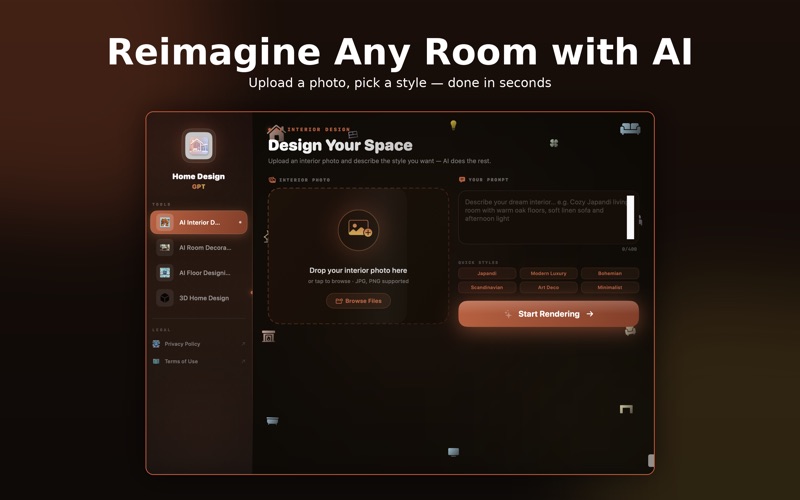
Turn your dream home into reality with Home Designer Pro – the ultimate AI-powered home, interior, and floor design tool! Whether you're an interior designer, architect, or homeowner, this app provides powerful tools to create stunning room layouts, home interiors, and floor plans with ease. With an intuitive drag-and-drop interface, extensive furniture & decor library, and AI-powered smart tools, you can design, decorate, and customize every aspect of your home. Key Features: •> Home Interior Designer: - Design and visualize beautiful home interiors in 2D & 3D views - Customize walls, floors, ceilings, and lighting for a realistic home design - Choose from a huge collection of furniture, decor, and textures - Experiment with paint colors, wallpapers, and flooring options •> Floor Decoration & Planning: -> Create detailed and customizable floor plans for any home layout -> Adjust dimensions with smart measurement tools for precise accuracy -> Use AI-powered auto-layout suggestions for optimized space planning -> Save and export floor plans in PDF, PNG, or 3D formats •> Room Decoration & Customization: -> Decorate rooms with realistic furniture & decor elements -> Add tables, sofas, beds, kitchen units, and office furniture -> Change textures, colors, and materials for walls, floors, and furniture -> Experiment with lighting and accessories for a complete design look •> Additional Features: -> AI-Powered Design Assistance – Get instant smart suggestions for layouts -> 2D & 3D Visualization – Switch between blueprint mode & lifelike 3D models -> Drag-and-Drop Editor – Seamless and easy-to-use design interface -> Dark & Light Mode Support – Design comfortably at any time -> Save & Export Designs – Export in PDF, PNG, or 3D files for easy sharing •> Who is This App For? -> Homeowners & DIY Enthusiasts – Plan renovations & home makeovers easily -> Architects & Interior Designers – Create professional designs & blueprints -> Real Estate Professionals – Showcase properties with realistic home staging -> Students & Hobbyists – Learn and practice home design effortlessly •> Why Choose Home Designer Pro? -> AI-powered for smart & quick home designing -> Large collection of furniture & decor elements -> Easy export & sharing options -> Perfect for professionals & beginners Design your dream home, decorate rooms, and create floor plans with ease. Download Home Designer Pro today and bring your home vision to life! Subscribe now to design your dream home, interior, and floor plans effortlessly with AI subscription required to unlock full features. https://www.apple.com/legal/internet-services/itunes/dev/stdeula/
Latest release
What’s New
Introducing 3D Home Design — one tool for Interior, Floor Plan, and Exterior renders, so you're no longer switching between separate screens. • Pick a category (3D Interior / 3D Floor Design / 3D Exterior) and get quick-style prompts tailored to it • Upload a photo, describe your vision, and generate a full 3D render • Every design is automatically saved to your Design History • Tap Use Again to instantly restore a past photo, prompt, and style • Preview your finished 3D design, then Share or Download it in one tap Give it a try from the sidebar and let us know what you think!
Audience growth
Ratings growth
Baseline captured. Growth appears after the crawler observes a changed rating count.
Momentum comes from crawler snapshots for the tracked storefront. “Viral growth signal” means unusually fast recent rating gains; it is an indicator, not download data.
Price tracking
Price intelligence
First snapshot captured. The trend line starts after the next crawler price observation.
- First observed Aug 7, 2026 · 12:14 AM Free
Screenshots