About this app
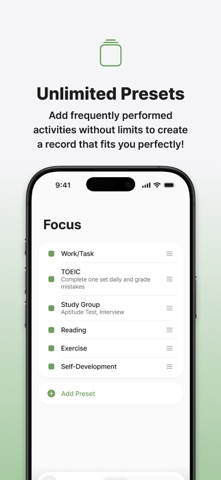
"I've clearly been busy, but when I look back, there's nothing to show for it." "I don't know how time passes — I just drift through the day." "I reply to a message and end up on social media for an hour... I keep putting things off." There's only one reason time management is hard: you can't see it! Track where and how much time you spend, and reflect on your day. You'll start to see the wasted time you never noticed, how often you switch tasks, and your unconscious behavioral patterns. Timing is based on MBI (Mindfulness-Based Intervention) theory, focusing on paying attention to the present moment and observing your habits without judgment. Instead of forceful screen blocking or group features that create exhausting competition, we designed a healthy, objective way to review your day. It’s all about 'reclaiming your time agency' — spending your time exactly where and how you want. From a day driven by time, to a day driven by you — that's Timing! ■ Effortless Tracking -Start and stop your timer with a single tap. -Easily add, edit, and delete records directly on the grid. ■ Live Activity -Record faster right from your lock screen. -Check your tracked time without even opening the app. ■ Home Screen Widgets -Add Timing's widget to your home screen! -Check your time and start recording directly through the widget. ■ Unlimited Presets -Save your frequently used activities as presets across 3 categories (Focus · Rest · Other). -Start tracking instantly from the home screen using your saved presets. -No limits on presets — customize Timing to fit your exact lifestyle! ■ Daily & Weekly Insights -Timeline view intuitively split into AM and PM. -Cumulative time spent per activity by time slot. -Percentage breakdowns by category and individual activities. -Focus-rest balance analysis. -Weekly heatmaps and time distribution charts by day of the week. ■ Beautiful, Easy-on-the-Eyes Grid -Visualize your day with a grid featuring 5 minutes per cell and 1 hour per row. -A touch of green — the most restful color — adds a stylish flair to your desk setup and daily records! ■ Streak Tracking -Keep your momentum going and break your longest streak record every day! Terms of Use (EULA): https://www.apple.com/legal/internet-services/itunes/dev/stdeula/ Privacy Policy: https://timing.nalda.co/privacy-policy
Latest release
What’s New
• Schedule reminders are now alarms. Start recording right from the lock screen alarm • Fixed the screen freezing after returning from the background
Audience growth
Ratings growth
Baseline captured. Growth appears after the crawler observes a changed rating count.
Momentum comes from crawler snapshots for the tracked storefront. “Viral growth signal” means unusually fast recent rating gains; it is an indicator, not download data.
Price tracking
Price intelligence
First snapshot captured. The trend line starts after the next crawler price observation.
- First observed Sep 8, 2026 · 2:02 PM Free
Screenshots