About this app
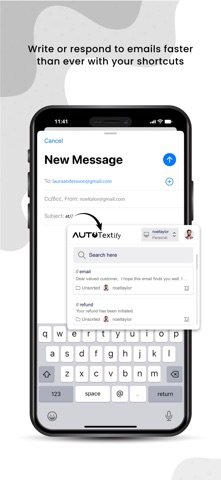
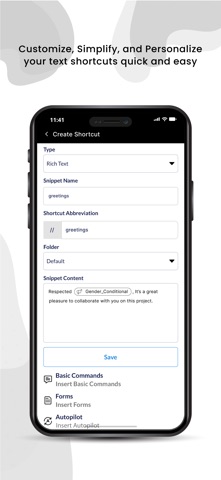
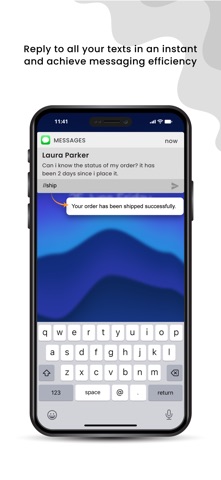
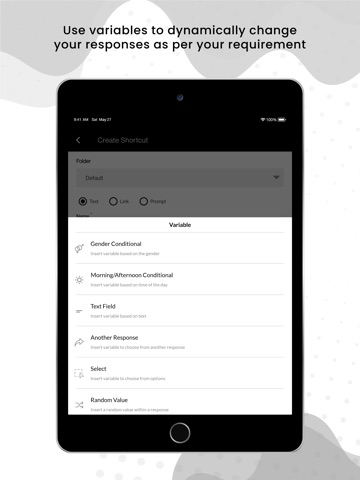
AutoTextify is a powerful text-expansion tool that transforms your workflow. It replaces repetitive typing with simple keystrokes, allowing users to insert text snippets, from single words to detailed paragraphs, using personalized abbreviations. Say goodbye to tedious typing and enjoy a more efficient way to communicate. Quickly Add Common Text: AutoTextify saves time and energy by letting you create custom abbreviations for commonly used expressions. For example, "tyvm" can expand into "Thank you very much," eliminating repetitive effort and boosting daily productivity. Accelerate Email and Document Responses: AutoTextify simplifies email and document drafting by letting you assign abbreviations to frequently used phrases. For example, "br" can expand to "Best regards," enabling quick insertion of pre-written text. This boosts efficiency and maintains accuracy and professionalism in communication. Boost Productivity with Templates: Easily create and manage templates for recurring tasks. Whether you’re writing emails, reports, meeting agendas, or any structured document, AutoTextify allows you to assign abbreviations to templates and insert them instantly. There is no need to start from scratch just type a shortcut and let AutoTextify handle the rest. Improve Accuracy and Consistency: By leveraging AutoTextify’s text expansion feature, you can eliminate errors and maintain uniformity in your communication. This is especially useful for frequently used terms, technical jargon, or company-specific language. With consistent, error-free content, you can ensure a professional tone across all your writing. Benefits of Using AutoTextify User-Friendly and Easy to Integrate: AutoTextify features a simple, intuitive interface for easy snippet creation, organization, and management. It integrates seamlessly with various platforms and applications, enhancing your workflow across emails, notes, and more. Error-Free Communication: AutoTextify minimizes spelling and grammatical errors. Predefined templates ensure polished, professional messages, enhancing smooth and effective communication. Improved Customer Service Efficiency: AutoTextify aids customer service teams by quickly inserting pre-written responses to common inquiries. This results in faster replies, consistent messaging, and enhanced customer satisfaction, making it indispensable for efficient and accurate service. Features Boosted Productivity: AutoTextify Keyboard, allows you to expand shortcuts into full text quickly and seamlessly. Privacy: AutoTextify Keyboard secures your private data without full access. It enables quick insertion of pre-written responses, leading to faster replies, consistent messaging, and enhanced customer satisfaction for customer service teams. In-App Purchase: In AutoTexify, we offer in-app purchase options with various subscription plans. Users can choose from monthly and yearly plans, family plans, team plans, and options for managing up to 100 accounts. The Starter plan is free, providing essential features and basic functionality. Limitations for Starter Plan: The Starter plan permits one workspace. Upgrade to create more. The Starter plan allows up to 10 snippets. Upgrade to create unlimited snippets. The Starter plan supports snippets of up to 1,000 characters. Upgrade for a 25,000-character limit. Pro Terms: Payment is charged at purchase. Subscription auto-renews unless turned off 24 hours before the end of the period. Manage in Account Settings. No cancellation during the active period. Unused trial forfeited upon subscription. Payments & Renewal: Charged at purchase. Auto-renews unless turned off 24 hours before the end. Manage in Account settings. No cancellation during the active period. Terms of use: https://autotextify.com/ios/terms-of-service Privacy policy: https://autotextify.com/privacy
Audience growth
Ratings growth
Baseline captured. Growth appears after the crawler observes a changed rating count.
Momentum comes from crawler snapshots for the tracked storefront. “Viral growth signal” means unusually fast recent rating gains; it is an indicator, not download data.
Price tracking
Price intelligence
First snapshot captured. The trend line starts after the next crawler price observation.
- First observed Aug 13, 2026 · 4:40 PM Free
Screenshots