About this app
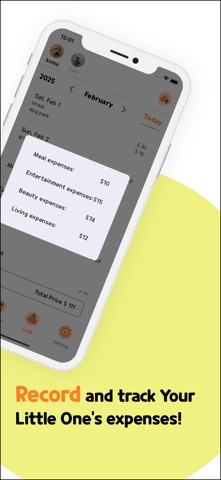
You can easily manage grooming schedules, vaccinations, and medication on the calendar. Perfect for pets who can't eat dry food due to illness or picky eating! Calculate the required calories based on their weight and check the calorie content of ingredients for homemade meals. With "Pet-Log~Our Pet Diary," manage schedules, nutrition, and expenses all in one place! 0. Enroll First My Little One (Pet) - Select Dog Or Cat - Upload Image (Take a photo OR Library) - Name (Required) - Weight (Required) - BirthDay (Required) - Gender - Male - Neutering - Female - Spaying - Pregent - Name Of Regular Hospital - Phone number Of Regular Hospital - Name Of Regular Grooming - Phone number Of Regular Grooming 1. Calendar Select Day and Record upcoming plans or past events 1-1. Edit Stamp Create / Change / Delete Stamp --- 2. Nutrition 2-1. Feed Enter the information of the feed you buy regularly - Maker - Number of serving Per Day - Amount per day (kcal) 2-2. Handmake If You make Your Little One's meals yourselves, Enter the information below - Amount per day (gram) - Amount of vegetables per day (gram) - Amount of protein per day (gram) 2-3. Check RER and DER Check the measured RER (basal metabolism) and DER (Energy required per day (kcal)) based on the information of **Your Little One** 2-4. Calculate Kcal Calculate the appropriate calories for a Your Little One’s grocery by adding meals 2-5. Edit Meal Create / Change / Delete Meal 3. Cost Record the consumption of Your Little One 3-1. Create / Delete Consumption - Category - Name of Product - Price 3-2. Consumption used per category, per Month 3-3. Edit Category Create / Change / Delete Category 4. Settings - Change Profile - Edit Stamp - editing a diet - Edit Category - language selection - Korean - Japanese 5. Add Little Your One
Latest release
What’s New
・ Changed UI/UX ・ Fix minor bugs
Audience growth
Ratings growth
Baseline captured. Growth appears after the crawler observes a changed rating count.
Momentum comes from crawler snapshots for the tracked storefront. “Viral growth signal” means unusually fast recent rating gains; it is an indicator, not download data.
Price tracking
Price intelligence
First snapshot captured. The trend line starts after the next crawler price observation.
- First observed Aug 26, 2026 · 10:09 PM Free
Screenshots