About this app
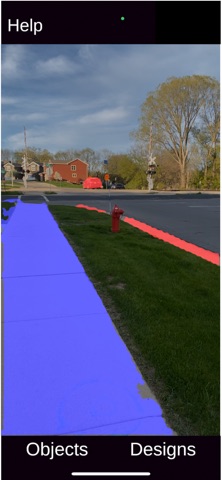
NavSight highlights what matters while you walk. Using your iPhone camera and on-device AI, NavSight detects people, vehicles, curbs, sidewalks, crossings, and obstacles in real time, then makes them stand out with customizable visual enhancements. It's a visual assistant designed to help you spot the things around you more easily as you move through the world outdoors. Everything runs entirely on your device. No internet connection, no accounts, and nothing ever leaves your phone. How it works Point your camera at the scene. NavSight recognizes objects and highlights them clearly, so the things you care about catch your eye instantly. Pick the customizations that suit you best NavSight adapts to how you see best: - Augmentation groups: sort the objects you care about into groups, and give each group its own visual enhancements, so you set the look once instead of adjusting every object. - Augmentation designs: add contour outlines and solid color overlays, increase object brightness, or apply flashing emphasis. - Colors: set high-contrast colors that work for your vision. - Darken background / show background in grayscale: play down the background so your selected objects stand out even more. Completely private All detection happens on your device. NavSight needs only camera access to work — no internet, no location, no tracking, no data collection. Built for accessibility NavSight was created as a visual aid for people who want extra help noticing important objects while walking outdoors. It works alongside the way you already get around. Everything on the interface works with VoiceOver for seamless navigation. Note: NavSight is a visual assistance tool, not a navigation or mobility device. It does not detect every object or hazard, and it can make mistakes. Use it the same way you would use any other visual assistant app, and do not rely on it for safety. Always stay aware of your surroundings and continue to use your usual mobility aids and judgment.
Latest release
What’s New
Enhanced Accessibility: every on-screen control — buttons, sliders, and switches — now works with VoiceOver.
Audience growth
Ratings growth
Baseline captured. Growth appears after the crawler observes a changed rating count.
Momentum comes from crawler snapshots for the tracked storefront. “Viral growth signal” means unusually fast recent rating gains; it is an indicator, not download data.
Price tracking
Price intelligence
First snapshot captured. The trend line starts after the next crawler price observation.
- First observed Aug 16, 2026 · 3:03 PM Free
Screenshots