About this app
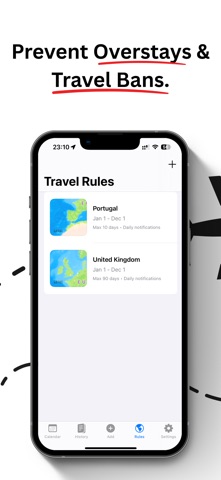
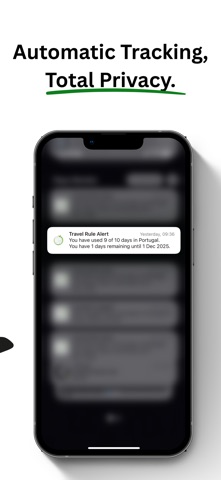
Days Monitor. Never overstay again. The automatic day counter for frequent flyers, digital nomads, remote workers, and anyone living a multi-border life. Days Monitor counts your days across countries, states, and provinces, automatically and privately. No spreadsheets. No guesswork. No surprises at the border or at tax time. WHY TRAVELLERS CHOOSE DAYS MONITOR Automatic day logging Your travel is logged quietly in the background from your device's own location data. Open the app and today is already there. Turn on background tracking and you never need to open it at all. Multi-country days, handled properly Cross a border in the morning and again in the afternoon? Days Monitor records each country separately for the same date, with its own pin, time, and city. Tap any day to swipe through every place you were. Rules for any country, any state, any province Set day limits for whatever your life requires: - Schengen 90/180 rolling window - US state residency day counts, with statute-based templates for 35 states - Canadian provincial day counts - 183-day tests for the UK, Ireland, Spain, Canada, Australia, Singapore, Mexico, New Zealand, UAE, Brazil and Georgia - Thailand's 180-day rule - Or build your own, fixed-period or rolling-window Templates are a starting point, not a ceiling. Every rule is yours to edit: the limit, the window, the dates, the alerts. Schengen tracking. 90 days, zero guesswork. See exactly how many of your 90 days you have used and how many remain, computed across the rolling 180-day window and updated as you travel. All 29 Schengen members are tracked, and each country only counts from the date it actually joined, so pre-accession days in Bulgaria, Romania and Croatia are handled correctly. Schengen residency for permit holders Hold a residence permit for a Schengen country? Set it once and your days at home stop counting against your 90/180 allowance. Days in other Schengen countries still count. Know before you book Add a trip you are considering and see exactly what it does to your allowance before you commit. Days used, days remaining, and status, projected across the worst 180-day window in your plan. Rebuild years of travel from your photos Already have years of travel but no log? Scan your photo library and Days Monitor reconstructs your history from GPS-tagged photos, processed entirely on your device. Nothing is uploaded. US and Canadian state and province tracking For relocators, snowbirds, remote workers and frequent interstate travellers. Track day counts against New York, California and 32 other states, each with its own statutory threshold, plus Canadian provinces. Overstay alerts Choose how many days ahead you want to be warned, and whether to be told once or daily. Days Monitor tells you before you hit a limit, not after. Home screen widget and iCloud sync Your remaining days at a glance, without opening the app. Sync across your devices through your own iCloud account. Private by design - Your travel history is never sent to our servers - We cannot see where you have been - Your data lives on your device and, if you choose, in your own iCloud - Strong account separation, even when two people share one iCloud Proof, in one tap Export clean, timestamped PDF and CSV travel reports for accountants, advisors, or your own records. No reformatting, no friction. Whether you are managing tax residency, navigating Schengen limits, watching US state day counts, or simply want an accurate record of where you have been, Days Monitor is built for the reality of modern global living. Precision and privacy, in your pocket. Days Monitor is a day-counting tool. It does not provide legal, tax, or immigration advice. Always confirm your position with a qualified professional. Terms of Use: https://daysmonitor.com/terms/ Privacy Policy: https://daysmonitor.com/privacy/
Latest release
What’s New
Version 4 is the biggest update Days Monitor has had. REBUILT ONBOARDING Tell us what you're tracking for and the app sets itself up around it. Log your first day during setup, or rebuild years of history from your photo library before you've even finished. ROLLING-WINDOW CUSTOM RULES Custom rules can now use a rolling window, not just fixed dates. Set "90 days in any 180" for any country, the same way Schengen works. 35 US STATE TEMPLATES Every state day-count threshold, sourced from the state's own statute, ready in one tap. Canadian provinces too. And templates are only a starting point: every rule stays fully editable, so you can tune the limit, window, and alerts to your own situation. A MAP THAT MAKES SENSE Zoomed out, each country is a single pin with your day count. Zoom in and it breaks apart into the individual places you logged. Flight paths connect your trips in order. CALENDAR AND DAY VIEW Every month now fits the screen properly. Tap any day for a quick summary without leaving the calendar. TRIP PLANNER See what a trip does to your Schengen allowance before you book it. WIDGET Cleaner summary line showing days used and days still available today. NEW LOOK New app icon and a redesigned sign-in screen. ALSO FIXED - iCloud sync now works properly for everyone (this had been silently failing) - Subscription status is far more reliable offline and after signing out and back in - Upgrade buttons inside rule screens now actually open the paywall - Deleting travel data now warns you when it will affect all your devices - Faster photo import, and it can be cancelled mid-scan
Audience growth
Ratings growth
Baseline captured. Growth appears after the crawler observes a changed rating count.
Momentum comes from crawler snapshots for the tracked storefront. “Viral growth signal” means unusually fast recent rating gains; it is an indicator, not download data.
Price tracking
Price intelligence
First snapshot captured. The trend line starts after the next crawler price observation.
- First observed Aug 23, 2026 · 5:07 AM Free
Screenshots