About this app
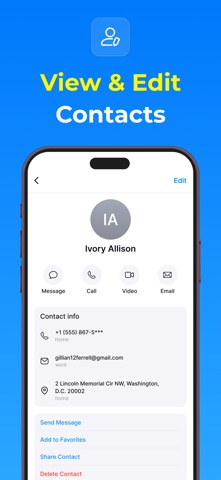
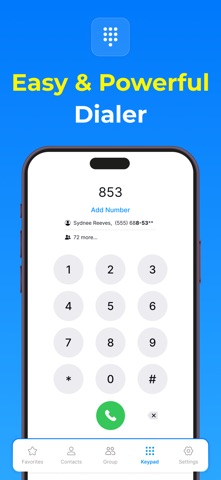
Keep Your Contacts Safe and Organized with Contacts Backup - Caller ID Your contact list is one of the most valuable assets on your phone. Whether it's for work, family, or friends, keeping your contacts safe, organized, and easy to access is essential. Introducing Contacts Backup - Caller ID, the ultimate solution for managing your contacts with ease and efficiency. With a simplify contact management, enhance communication, and protect your data. Effortless Backup for Peace of Mind One of the most crucial features is its ability to back up your entire contact list securely. Whether you're delete contact from phone, or just want to ensure you don’t lose your contacts, this app guarantees that all your contacts are safely backed up. With the touch of a button, you can instantly create a backup of your entire contact list and store it in the application, it’s easily recoverable at any time. You can schedule automatic backups to happen daily, weekly, or monthly, depending on your preference. Group Contact Management When you want to organize contacts by family, friends, work, or any custom category you prefer, Contacts Backup - Caller ID allows you to group contacts together for easy access. Grouping contacts helps reduce clutter and makes it easier to send messages or make calls to multiple people at once. With just a few taps, you can add or remove contacts from a group and even customize the names of the groups to suit your needs. This feature streamlines your contact management and makes communication quicker and more organized. Find and Merge Duplicate Contacts Have you ever found that your contact list has duplicates? Contacts Backup - Caller ID makes it easy to find duplicate contacts in your list and merge them with just a tap. The app automatically scans your entire contact list and highlights any duplicate entries, making it simple to clean up your contacts and avoid confusion. Merging duplicates is effortless – all you need to do is confirm, and the app will combine the information into one contact entry. This ensures that you have the most accurate and up-to-date information for each contact without any repetition. Edit, Delete, and Rename Contacts Managing your contact list also means occasionally making changes to your contacts. Contacts Backup - Caller ID provides all the tools you need to easily edit, delete, or rename your contacts as required. If a phone number has changed, a contact’s name has changed, or you simply need to update their details, this app allows you to make changes in just a few taps. You can quickly edit phone numbers, email addresses, and other contact details. Additionally, if you ever need to remove a contact from your list, you can delete them with ease, ensuring your contact list stays clean and relevant. Add Contacts to Your Favorites List We all have those contacts that we reach out to most often—whether it’s your spouse, best friend, or colleague. With Contacts Backup - Caller ID, you can add your most important contacts to your favorites list, so they are always easy to find. By adding contacts to the favorites section, you can quickly call or message them without having to search through your entire contact list. Quick Call and Message Features Communication should be fast and effortless. With Contacts Backup - Caller ID, making a call or sending a message has never been easier. The app features a streamlined interface that allows you to quickly search for and contact any person in your contact list. Simply tap on a contact’s name, and you’ll have the option to call, text, or even email them without navigating through multiple menus. Privacy Policy - https://contactsphonedialer.blogspot.com/2025/02/privacy-policy.html Terms & Conditions - https://contactsphonedialer.blogspot.com/2025/02/terms-conditions.html EULA - https://contactsphonedialer.blogspot.com/2025/02/end-user-license-agreement-contacts.html
Audience growth
Ratings growth
Baseline captured. Growth appears after the crawler observes a changed rating count.
Momentum comes from crawler snapshots for the tracked storefront. “Viral growth signal” means unusually fast recent rating gains; it is an indicator, not download data.
Price tracking
Price intelligence
First snapshot captured. The trend line starts after the next crawler price observation.
- First observed Aug 11, 2026 · 7:37 AM Free
Screenshots