About this app
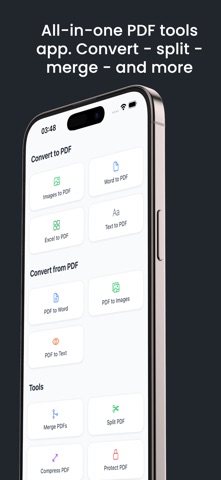
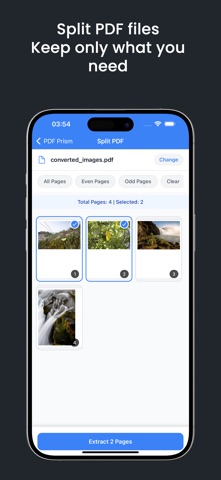
PDF workbench: The Complete PDF Editor and Converter. Create, edit, sign, and transform PDF documents instantly on your iPhone and iPad. KEY FEATURES: Convert Files to PDF: - Convert images into professional PDFs - Convert Word documents to PDF - Convert Excel spreadsheets to PDF - Create PDFs from text files Convert PDFs to Other Formats - Extract text from PDFs (OCR) - Convert PDFs to Word documents - Convert PDFs into high-quality images: JPEG and PNG Essential PDF Tools - Merge multiple PDFs into one document - Split PDFs and extract specific pages - Compress PDFs to reduce file size - Add digital signatures to documents - Apply custom watermarks - Protect PDFs with password encryption Professional Features - Multiple signature styles and fonts - Adjustable compression levels - Batch processing capabilities - Easy page organization - Custom watermark positioning - Flexible page selection User-Friendly Interface - Clean, intuitive design - Simple drag-and-drop functionality - Quick file preview - Easy document management - Organized file storage Perfect for professionals, students, and anyone who works with PDF documents. Our app provides all the tools you need to manage your PDFs efficiently on your mobile device. *Free version includes limited number of conversions; unlimited with subscription* *Ad-free experience available with subscription. *Subscription requires a purchase, price may vary depending on location. Some conversions are done on a secure cloud server so you must have an internet connection to use this app. You should be aware that by using this app, you agree that your files will be sent over the internet from the app to the cloud server for conversion. Note: price may vary depending on location. Information about the auto-renewal of subscription: - Payment will be charged to iTunes Account at confirmation of purchase; - Subscriptions are billed monthly or annually at the rate based on the subscription plan - Subscription automatically renews unless auto-renew is turned off at least 24-hours before the end of the current period; - The account will be charged for renewal within 24-hours before the end of the current period. The cost depends on the selected plan; - Subscriptions may be managed by the user and auto-renewal may be turned off by going to the user's Account Settings after purchase By downloading and using this app, you agree to our Terms of Use: http://pdfprism.novascriptum.com/terms-of-use/ Download now and transform the way you work with PDFs!
Latest release
What’s New
Bug fixes RTL support
Audience growth
Ratings growth
Baseline captured. Growth appears after the crawler observes a changed rating count.
Momentum comes from crawler snapshots for the tracked storefront. “Viral growth signal” means unusually fast recent rating gains; it is an indicator, not download data.
Price tracking
Price intelligence
First snapshot captured. The trend line starts after the next crawler price observation.
- First observed Sep 4, 2026 · 7:23 AM Free
Screenshots