About this app
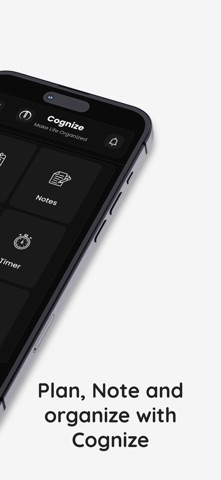
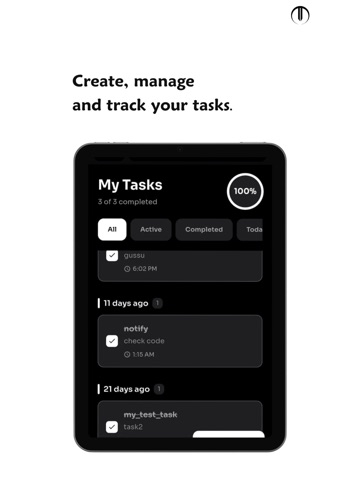
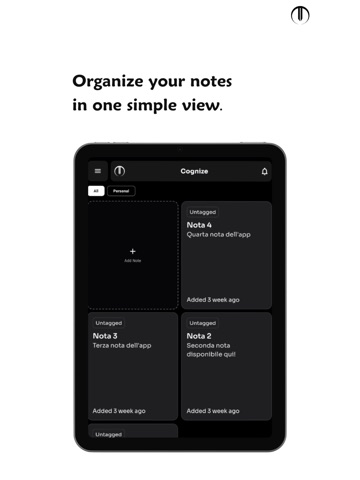
Cognize brings your habits, focus, planning, tasks, notes, secure vault, and subscriptions into one clean productivity app. Instead of juggling multiple apps, use one place to build routines, plan your day, focus on important work, organize tasks, protect information, and stay consistent. HABIT TRACKER Build habits that stick with daily tracking, streaks, reminders, and progress insights. Set your habits, choose your frequency, and stay consistent without feeling overwhelmed. - Daily habit tracking and streaks - Custom habit frequency - Smart reminders and notifications - Visual progress tracking POMODORO FOCUS TIMER Turn intention into focused work with structured focus sessions and breaks. Whether you're studying, working on a project, or handling a deadline, Cognize helps you protect your time and see your effort. - Customizable focus and break intervals - Focus session history - Distraction-free focus sessions - Links with your planning workflow HARD FOCUS MODE When distractions need to stop, Hard Focus Mode helps you commit to the task in front of you. Stay in a focused workflow and spend less time switching between distractions. - Strict focus sessions - Reduced distractions - Designed for deep work VISUAL DAY PLANNER See your day as a visual timeline instead of a list of disconnected tasks. Create time blocks, drag them to reschedule, resize them as plans change, and connect tasks and focus sessions to your schedule. - Visual time-blocked daily schedule - Drag to reschedule and resize blocks - Productivity-focused categories and events - Routine templates - Productivity and quality analytics - Direct task and Pomodoro linking - Quick completion toggles - Fast editing and deletion TO-DO LIST Keep everyday tasks simple and organized with a flexible checklist built around how you work. - Task and checklist management - Task templates - Categories and priority levels - Recurring tasks - Clear completion tracking SUBSCRIPTIONS TRACKER Keep recurring subscriptions organized in one place. Know what you're paying for and when upcoming payments are due without checking multiple services. - Track recurring subscriptions - View upcoming payments - Keep subscription details organized NOTES & SECURE VAULT Keep important information close at hand. Capture ideas, save notes and files, and securely store local passwords and other sensitive information in your vault. - Notes and quick ideas - File storage - Secure local password storage - Important information in one place QUICK ACCESS Reach the tools you use most without unnecessary steps. Get to habits, tasks, planning, and focus sessions quickly and keep your workflow moving. PERSONALIZE YOUR EXPERIENCE Make your productivity space fit your style with personalization options and texture customization. OFFLINE ACCESS Stay productive even without a network connection. Access supported core information and continue key productivity activities offline, with syncing when connectivity is available. ACHIEVEMENTS & PROGRESS Stay motivated as you move forward. Earn achievements, build consistency, and see your productivity journey over time. ONE PRODUCTIVITY SYSTEM Cognize is built for students, professionals, freelancers, creators, and anyone tired of switching between separate apps for habits, tasks, calendars, focus sessions, notes, and personal organization. The goal is simple: less app switching, less friction, and more meaningful progress. Cognize gives you one connected system to plan your day, focus on what matters, build better habits, and keep everything you need close at hand. Download Cognize and build a more focused, organized daily routine. Terms of Use (EULA): https://www.apple.com/legal/internet-services/itunes/dev/stdeula/ Privacy Policy: https://github.com/cognizeapp/cognize-privacy-policy/blob/main/index.md
Latest release
What’s New
What’s New - New Day Planner Tool - New Subscriptions Tracker Tool - Expanded achievements - Updated and refined the onboarding experience - Added personalized in-app guidance - Enhanced the overall UI and user experience - Improved app stability and performance - Bug fixes and other improvements Our team is continuously improving Cognize and actively listening to your feedback. Thank you for being part of Cognize. — The Cognize Team
Audience growth
Ratings growth
Baseline captured. Growth appears after the crawler observes a changed rating count.
Momentum comes from crawler snapshots for the tracked storefront. “Viral growth signal” means unusually fast recent rating gains; it is an indicator, not download data.
Price tracking
Price intelligence
First snapshot captured. The trend line starts after the next crawler price observation.
- First observed Aug 19, 2026 · 9:40 AM Free
Screenshots