About this app
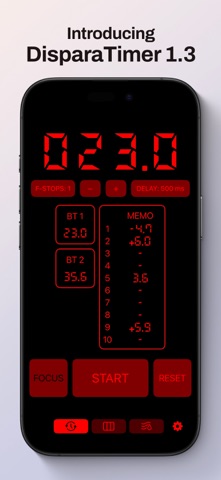
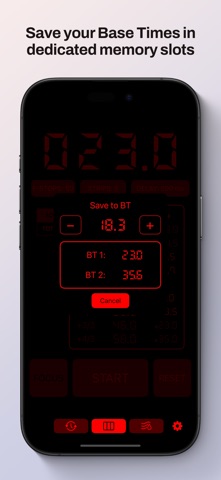
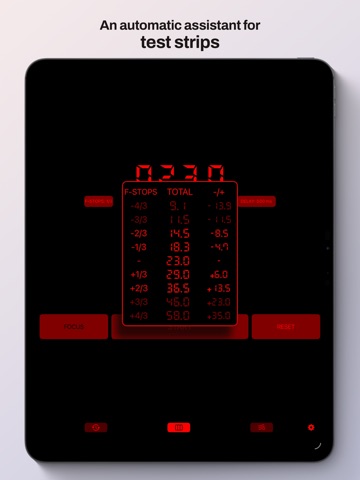
DisparaTimer is a mobile app that, when connected to a Raspberry Pico W/WH, can control the exposure time of a photographic enlarger using a power relay. The physical setup is inexpensive and easy to assemble. DisparaTimer has two operation modes. The first is a traditional timer mode, where you set a specific time for each exposure. The second is designed for creating test strips with constant fractional step increments over a base time. On iPad (iPadOS 17 and later), DisparaTimer includes a landscape-only notes panel that lets you add photos or images of your test strips and make handwritten or visual annotations directly on them.
Latest release
What’s New
This update brings a brand-new Notes system to the iPad! A dedicated place to write down your workflow and keep everything together with your timings. Here’s what’s new: Notes system (new): • Added a full Notes panel inside the app. • Create, rename, and manage multiple notes. Image annotations (new): • Added a built-in photo annotation system. • Works with both finger and Apple Pencil. • Includes a clear annotations option to start over anytime. Export (new): • Added an option to export and share your notes. • PDF export, ready to save to Files or share via AirDrop/Mail. Si me dices el nombre exacto que usas en la app para esa sección (“Notas”, “Cuaderno”, “Darkroom Notes”, etc.), te lo ajusto para que suene todavía más “marca DisparaTimer/Color Timer”.
Audience growth
Ratings growth
Baseline captured. Growth appears after the crawler observes a changed rating count.
Momentum comes from crawler snapshots for the tracked storefront. “Viral growth signal” means unusually fast recent rating gains; it is an indicator, not download data.
Price tracking
Price intelligence
First snapshot captured. The trend line starts after the next crawler price observation.
- First observed Aug 12, 2026 · 5:54 PM Free
Screenshots