About this app
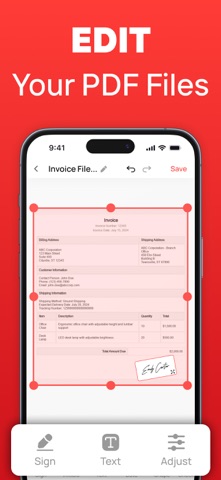
PDF Converter App – Scan, Edit, Sign & Share PDFs Transform how you work with documents using PDF Converter – your all-in-one PDF toolkit. Effortlessly scan, convert, edit, and sign PDF files on the go with a fast, secure, and intuitive experience. Whether you're a student, professional, or freelancer, PDF Converter gives you the power of a complete document suite right in your pocket. Core Features: • Scan & Create PDFs – Instantly create PDF files by scanning documents using your device’s camera. Capture receipts, contracts, notes, and more in high quality. • Scan Limit – Start with up to 20 scans to create PDFs without restrictions or complexity. • PDF Editing – Add or edit text, insert dates, draw shapes, place checkmarks or stamps, and personalize any PDF with ease. • Digital Signature – Add your handwritten signature directly to any selected PDF. Sign legal documents, contracts, and forms on the go. • Sign and Share – Easily place your signature on a PDF and export, download, or share it in just a few taps. • File Import – Import any PDF document from your device and edit or sign it within seconds. • Convert to PDF - Turn Image to PDF – Convert up to 20 images (JPG, PNG, JPEG) into a single high-quality PDF file with just a few clicks. - Convert DOC to PDF – Convert Word documents into PDF format for easy sharing and universal compatibility. - Convert PPT to PDF – Turn PowerPoint presentations into sleek, portable PDFs.Easily convert PPTs into high-quality PDF documents. • Convert from PDF - PDF to Word – Convert PDF files back into editable Word documents with perfect formatting. - Need to make changes? Quickly convert PDFs back into editable formats like Word or PowerPoint. More Powerful Tools: - Import files from your device or cloud storage - Edit and share scanned or converted documents easily - Export signed and modified files instantly via email or share apps - Merge, compress, and organize PDF files for efficient file management Whether you need to digitize paperwork, prepare a presentation, or sign an agreement on the fly, PDF Converter & Editor is designed to help you get more done—faster. Why Choose PDF Converter App? Whether you're managing work documents, handling contracts, or simply organizing your digital files, PDF Converter App gives you the power to create, convert, sign, and edit PDFs quickly and easily — anytime, anywhere. Perfect for students, professionals, and anyone who deals with documents on the go. Subscription Details: Certain features like File to PDF, Image to PDF, PPT to PDF, PDF to Word, and extended Scan to PDF access are available only with a subscription. - Weekly Plan: $4.99/week with a full access. - Annual Plan: $19.99/year with 3-day free trial. Payment will be charged to your iTunes Account upon purchase confirmation. Your subscription automatically renews unless you turn off auto-renew at least 24 hours before the current period ends. Your account will be charged for renewal within 24 hours of the current period’s end. You can manage or cancel your subscription by visiting your iTunes Account settings. Download PDF Converter app today and take full control of your document workflow – scan, sign, edit, and convert with confidence!
Latest release
What’s New
Say hello to your PDF companion! * Annotate, sign, and edit your PDFs with simplicity & ease. * Convert files into multiple formats with just a few steps. * Designed to make your document workflow faster & smarter. * A professional and reliable way to manage documents.
Audience growth
Ratings growth
Baseline captured. Growth appears after the crawler observes a changed rating count.
Momentum comes from crawler snapshots for the tracked storefront. “Viral growth signal” means unusually fast recent rating gains; it is an indicator, not download data.
Price tracking
Price intelligence
First snapshot captured. The trend line starts after the next crawler price observation.
- First observed Aug 20, 2026 · 12:33 PM Free
Screenshots