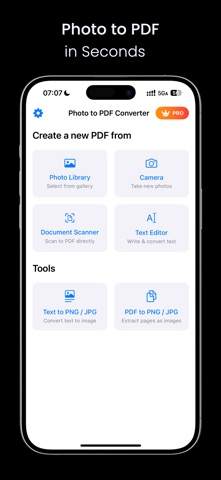
About this app
Convert Photo to PDF, Image to PDF, or Document to PDF — Instantly and Offline. This Photo to PDF Converter App lets you easily convert photos to PDF, images to PDF, or even scanned documents to PDF right on your iPhone. Whether you're working with JPG to PDF, PNG to PDF, or camera scans — this fast, simple, and secure PDF creator makes it effortless. Perfect for converting homework, receipts, ID cards, reports, or photo albums into high-quality PDF files. ► Core Features: • Convert JPG, PNG, and scanned photos to PDF • Use your camera as a mobile scanner app to scan documents to PDF • Batch convert multiple images to PDF in one go • Customize page size, margins, and orientation • 100% offline PDF converter — no internet needed • Import from Photos, Camera, Files, or clipboard • Share or print your PDF documents anytime ► Why Choose This PDF Converter: • Clean and intuitive PDF maker app design • Works great for homework scanner, business use, and personal archives • Smart file naming and support rename pdf • Adjust image quality, and manage PDF settings easily ► Use Cases: • Convert homework photos to PDF for school • Create PDF files from receipts, invoices, and utility bills • Scan passport or ID to PDF • Make photo albums or travel documents into a single PDF Download this Photo to PDF Converter now — the easiest way to create offline PDF files from your photos, images, and documents with one tap. Related Links: – link to the Terms of Use (EULA) https://www.apple.com/legal/internet-services/itunes/dev/stdeula/ – link to the privacy policy https://beauty-of-pixel.tech/privacy.html
Latest release
What’s New
Updates in this pdf scanner version 1. UX improvement 2. Create a pdf with only thre taps
Audience growth
Ratings growth
Baseline captured. Growth appears after the crawler observes a changed rating count.
Momentum comes from crawler snapshots for the tracked storefront. “Viral growth signal” means unusually fast recent rating gains; it is an indicator, not download data.
Price tracking
Price intelligence
First snapshot captured. The trend line starts after the next crawler price observation.
- First observed Aug 8, 2026 · 8:44 AM Free
Screenshots