About this app
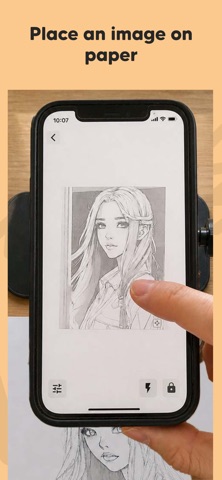
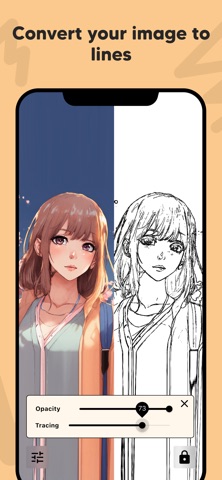
Bring your drawings to life with AR Draw: Trace & Sketch Master! This innovative app uses augmented reality to help you effortlessly trace and sketch any image onto paper, making it perfect for artists, hobbyists, students, and beginners. Key Features: Draw Any Image on Paper: Select any image from your gallery and project it onto your real-world paper using AR technology. Easy Image Placement: Position the image on your paper exactly where you want it, ensuring accurate sketches every time. Adjust Image Opacity: Make tracing simple by setting the image opacity. See both your drawing and the reference image clearly as you sketch. Zoom for Fine Details: Zoom in to capture intricate details and create precise illustrations with ease. Image to Line Conversion: Convert your photos into clear outlines or line art for easier tracing and drawing. How It Works: Choose an image from your device or take a new photo. Place the image on your drawing paper using your device’s camera and AR preview. Adjust the opacity and zoom for perfect visibility and detail. Start tracing—your device will show your hand and the paper with the image overlay, making it easy to sketch accurately. With AR Draw: Trace & Sketch Master, anyone can create beautiful drawings by tracing faces, objects, landscapes, or cartoons. Whether you're practicing new techniques, learning to draw, or making custom gifts, this app makes drawing more accessible than ever. Perfect For: Artists & Designers Students & Teachers Kids & Adults Anyone learning to draw No expensive equipment required—just your phone, paper, and a pencil! Download AR Draw: Trace & Sketch Master now and become a tracing and sketching pro using the power of AR! By using this app, you agree to Apple's standard End User License Agreement (EULA), available here: https://www.apple.com/legal/internet-services/itunes/dev/stdeula/
Latest release
What’s New
Improve stability of the app
Audience growth
Ratings growth
Baseline captured. Growth appears after the crawler observes a changed rating count.
Momentum comes from crawler snapshots for the tracked storefront. “Viral growth signal” means unusually fast recent rating gains; it is an indicator, not download data.
Price tracking
Price intelligence
- First observed Aug 18, 2026 · 3:15 PM Free
Screenshots