About this app
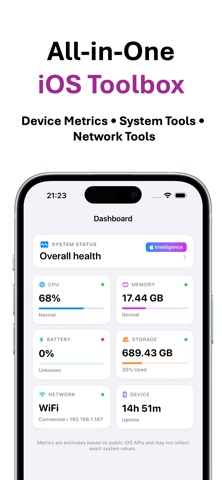
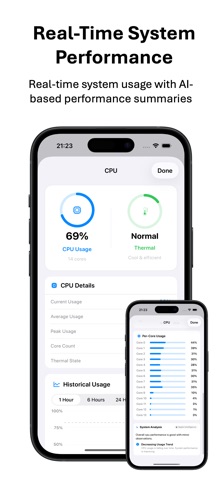
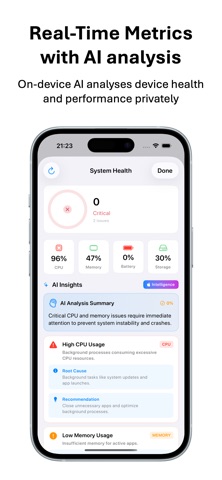
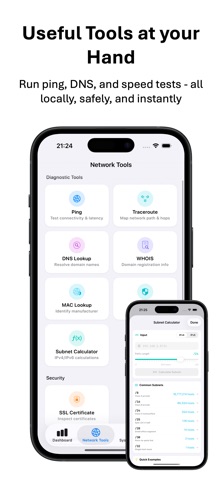
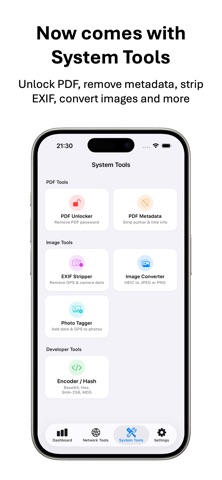
StatBoard is a real-time system monitoring and network diagnostics toolbox designed specifically for power users. Built using native SwiftUI interface with a zero-telemetry, zero-tracking architecture, no ads and no third party libraries, StatBoard exposes the deep internal plumbing of your iPhone without sacrificing your privacy. Whether you need to profile live hardware performance, run cryptographic hashes, clean metadata, map intermediate network latency, or inspect low-level hardware registers, StatBoard wraps professional utilities inside an elegant, theme-aware layout. Features 1. Real-Time Hardware Performance Monitors • CPU Insights: Live tracking of overall workload with real-time per-core usage patterns alongside thermal states. • Memory breakdown: Instant metrics covering Active, Wired, Inactive, and Compressed memory allocation. • Storage Allocation: Direct tracking of volume capacity and opportunistic disk availability parameters. • Battery Diagnostics: Live monitoring of device metrics, charging state and health telemetry thresholds. 2. Advanced Network Utilities Suite • Ping & Traceroute Engine: Measure network round-trip times (RTT) or run continuous host ping sequences. • MAC Vendor Search: Query raw hardware addresses against IEEE OUI database entirely offline. • Additional Diagnostics: Includes deep DNS Lookup, local Port Scanners, HTTP Request analysis, Subnet Calculators, WHOIS data parsing, SSL Certificate validation workflows, TLS Protocol Inspector, LAN Device Scanner, DNS Propagation Checker, NAT Type & STUN Probe, IP/Domain Blacklist, Network Diagnostics Report. 3. On-Device System Asset Processing • PDF Utility Hub: Instantly remove restrictions and password locks from secured PDF bundles, or strip tracking metadata and invisible XMP streams with absolute fidelity. • Image Format Transcoder: Seamless batch conversion for space-heavy HEIC images or local assets into optimized JPEG and PNG. • Photo Time & Location Tagger: Select up to 20 photos at once and apply the same date, time, and GPS location to all of them in a single tap • Toggle live reduction options to strip underlying EXIF GPS logs, device identifiers, and camera profile properties. • Cryptographic Text Encoder: Rapidly encode or decode via standard Base64, Hexadecimal formats, or calculate rigorous cryptographic integrity footprints utilizing secure SHA-256 and MD5 hash protocols.
Latest release
What’s New
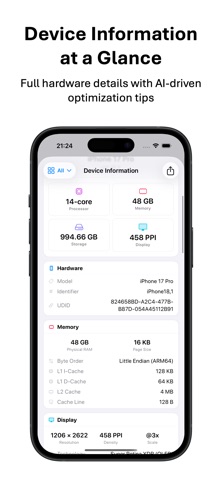
1. CPU now shows system-wide usage with load averages and efficiency/performance core split; memory adds a full Activity Monitor style breakdown with live pressure; network shows live upload/download speeds and session totals; storage lists volumes with filesystem details; device info adds chip and core specs, all from real on-device APIs, with honest unavailable labels when iOS does not expose a metric. 2. Share the same UI theme with StatBoard for macOS 3. Bug fixes and performance improvements
Audience growth
Ratings growth
Baseline captured. Growth appears after the crawler observes a changed rating count.
Momentum comes from crawler snapshots for the tracked storefront. “Viral growth signal” means unusually fast recent rating gains; it is an indicator, not download data.
Price tracking
Price intelligence
First snapshot captured. The trend line starts after the next crawler price observation.
- First observed Aug 14, 2026 · 12:49 AM Free
Screenshots