About this app
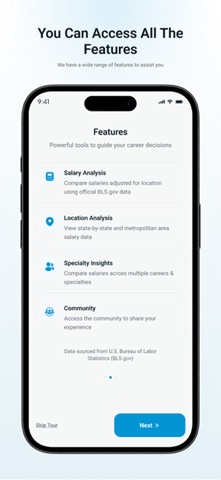
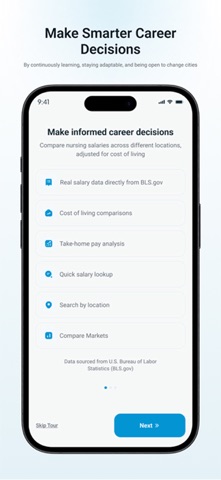
Description: Map My Pay is the salary comparison and cost-of-living app built specifically for nurses. Whether you're a new grad picking your first city or a seasoned RN exploring a better financial opportunity, this app shows you what you'll actually take home after taxes and housing — not just what the job posting says. WHAT YOU CAN DO Compare salaries across 1,000+ cities for RNs, LPNs, Nurse Practitioners, CRNAs, Nurse Midwives, Nurse Managers, Home Health Aides, and Nursing Instructors. See your net pay after federal tax, state tax, Social Security, Medicare, and SDI — broken down monthly and annually. View real home prices and rent costs pulled from Zillow, then compare what you'd have left over each month if you owned vs. rented. Browse houses for sale and apartments for rent in cities you're considering so you can start planning your move right away. Use the interactive hospital map to tap any hospital and see the median salary, housing costs, crime rate, and estimated take-home pay for nurses nearby. Explore job listings to find open nursing positions in the cities and hospitals that interest you most. NEW TOOLS & CALCULATORS Hospital Salary Calculator — Compare salaries at top-paying hospitals across California and other states. Adjust for 401k contributions, FSA, and other deductions to see your true take-home. Tax Calculator — Enter your salary and see a full federal and state tax breakdown for any city. Investment & Retirement Calculator — Project how your savings will grow over time based on your income, savings rate, and city of residence. Student Debt Repayment Calculator — Model different repayment strategies to see how quickly you can pay off nursing school loans. Life Insurance Quote Calculator — Get estimated life insurance quotes based on your age, health, and coverage needs. COURSES & CAREER RESOURCES Access courses designed to help nurses relocate to high-paying areas like Northern California. Learn how to identify top-paying hospitals, navigate licensing across states, and negotiate your best offer. COMMUNITY Share your paystubs, contracts, and real-world experiences with other nurses. Browse posts by category — hospital reviews, salary discussions, career advice, and debt & finance. See what nurses in your target city are actually earning and how they feel about living there. CITY DATA AT YOUR FINGERTIPS Every city profile includes salary data sourced from the U.S. Bureau of Labor Statistics (BLS.gov), median home prices and rent, crime rates graded from Low to Severe, number of hospitals, monthly temperature averages, demographics, education levels, and income distribution. Compare cities side-by-side and filter by what matters most to you. WHO IT'S FOR New grads figuring out where to start their career. Mid-career nurses looking for a financial fresh start. Nurse practitioners evaluating multiple job offers. Travel nurses exploring permanent placement options. Any nurse who wants to stop guessing and start planning. SUBSCRIPTION OPTIONS Free — Access core salary lookups, city data, and community features with daily limits. Plus — Unlock more daily searches, the investment calculator, and expanded city comparisons. Pro — Unlimited access to all tools, calculators, job listings, and priority new features. Payment will be charged to your Apple ID account at confirmation of purchase. Subscriptions automatically renew unless canceled at least 24 hours before the end of the current period. You can manage or cancel your subscription anytime in your Account Settings. Privacy Policy: https://mapmypay.com/privacy-policy Terms of Use: https://mapmypay.com/terms-conditions
Latest release
What’s New
Refreshed the comments section with cleaner spacing and simpler reply threads, fixed an issue where usernames were not tagging correctly in comment mentions, and fixed the tour replay button so that dismissing it now keeps the tour dismissed.Discover Featured Jobs — top employer opportunities are now highlighted at the top of the Jobs page,so you never miss the best openings.
Audience growth
Ratings growth
Baseline captured. Growth appears after the crawler observes a changed rating count.
Momentum comes from crawler snapshots for the tracked storefront. “Viral growth signal” means unusually fast recent rating gains; it is an indicator, not download data.
Price tracking
Price intelligence
First snapshot captured. The trend line starts after the next crawler price observation.
- First observed Aug 19, 2026 · 5:14 AM Free
Screenshots