About this app
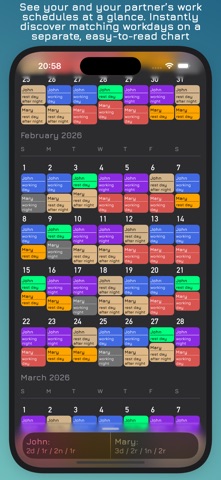
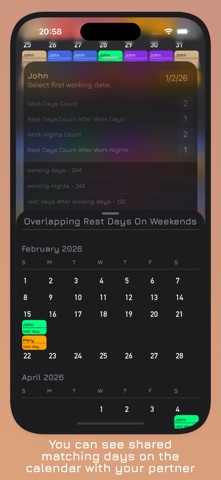
Calendarity is the ultimate app for partners who work irregular hours or shifts and want to stay in sync. For couples juggling day and night schedules, Calendarity makes it easy to coordinate time together. Just set up your personal work shifts – including day shifts, night shifts, or any custom hours – and share them in a single combined calendar. Key features: - Customizable Shifts: Define your work schedule for each day of the month. Enter specific day or night shifts (or any hours) and edit as needed. - Shared Calendar: See both your schedule and your partner’s schedule side by side in one unified calendar. Quickly spot who is working when and plan your time together. - Detailed Statistics: View insightful reports on your work patterns. Get breakdowns of hours and shifts for weekdays vs weekends, and see totals for each partner. - Schedule Comparison: Compare schedules easily. Find out when you both work on the same days, or when you both have days off at the same time. Highlight overlapping work hours or free time to make planning a breeze. - Weekend Planner: Special features to manage weekend shifts. See at a glance when both of you are free on weekends or when you share weekend shifts – perfect for planning trips or relaxing together. - Intuitive Design: A simple, user-friendly interface that makes scheduling easy. Add or change shifts anytime, and the calendar updates automatically. Whether you’re shift workers, healthcare professionals, parents, or anyone with changing schedules, Calendarity helps you stay connected. No more missed opportunities: sync your shifts and know exactly when you and your partner can work together or unwind together. Try Calendarity today and take control of your time as a team.
Latest release
What’s New
- Improved manual schedule editing flows. - Refined single-day and multi-day editing behavior. - General stability improvements and bug fixes. - Added a new onboarding section. - Minor fixes
Audience growth
Ratings growth
Baseline captured. Growth appears after the crawler observes a changed rating count.
Momentum comes from crawler snapshots for the tracked storefront. “Viral growth signal” means unusually fast recent rating gains; it is an indicator, not download data.
Price tracking
Price intelligence
First snapshot captured. The trend line starts after the next crawler price observation.
- First observed Aug 19, 2026 · 7:20 PM Free
Screenshots