About this app
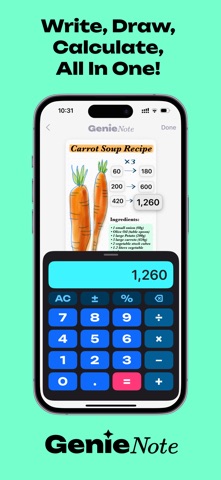
Scribble Smarter!! Write, sketch, and calculate — all on one canvas. GenieNote turns your iPhone and iPad into a freeform workspace where handwritten notes, a smart calculator, photo stickers, and sticky labels live together on the same page. HANDWRITE & SKETCH FREELY • Natural ink with Apple Pencil or your finger • Smart canvas: pinch to zoom, pan, and resize freely • Quick-access pen, highlighter, eraser, and color presets BUILT-IN CALCULATOR • Basic arithmetic with ± and % (more functions coming soon) • Drag results onto the page as floating number stickers • Double-tap any saved number to label it ("budget", "total"…) • Drag any number back into the calculator to reuse it • Pro tip: tap an operator (like +), then tap any number on the canvas for instant copy & paste STICKY MEMO LABELS • Place anywhere, resize from any corner • Choose background color, text color, size, and font PHOTO COLLAGES & STICKERS • Add photos from your library or camera • Automatic background removal turns photos into stickers • Fine-tune cutouts by hand with the eraser • Mix photos with sketches for one-of-a-kind pages MADE FOR REAL LIFE • Class notes: formulas, diagrams, and instant math — great for STEM and test prep • Budgets & expenses: shopping lists, travel costs, and running totals without leaving the page • Recipes: ingredients, steps, portions, and conversions in one place • Events & projects: plan parties, track tasks and costs, brainstorm freely • Fitness & meals: log workouts, calories, and goals • Journaling: mind maps, story layouts, and visual goal boards • DIY: sketch plans, note measurements, and estimate materials • Travel & daily planning: itineraries, checklists, and daily budgets WHY GENIENOTE? • Visual memory: keep key figures right next to your sketches • Zero context switching: no more jumping between a notes app and a calculator • For students, planners, engineers, designers — anyone who thinks in words AND numbers Universal app: runs great on iPhone and iPad, optimized for Apple Pencil.
Latest release
What’s New
This update makes GenieNote dramatically lighter and faster: • Major storage cleanup: the app now automatically removes gigabytes of leftover data that older versions could accumulate — many users will see its storage footprint shrink dramatically • Deleting a note now frees up space immediately • Saving is faster and more reliable, especially in notes with many photos • Fixed: cut-out photo stickers losing their transparent background after reopening a note • Notes trapped by older versions may automatically reappear in your list — welcome back! (If you had deleted them, deleting them again now sticks.) Thanks for using GenieNote — questions or ideas? We'd love to hear from you.
Audience growth
Ratings growth
Baseline captured. Growth appears after the crawler observes a changed rating count.
Momentum comes from crawler snapshots for the tracked storefront. “Viral growth signal” means unusually fast recent rating gains; it is an indicator, not download data.
Price tracking
Price intelligence
First snapshot captured. The trend line starts after the next crawler price observation.
- First observed Sep 17, 2026 · 6:48 PM Free
Screenshots