About this app
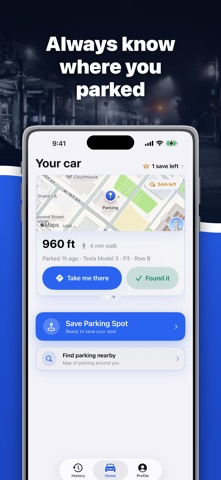
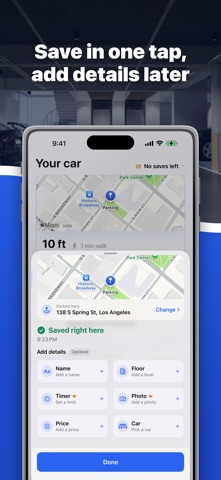
Where’s My Car: Tracker — your all-in-one parking companion. Never wander around looking for your car again. Save your parking spot with one tap, find nearby parking, and get back to your vehicle stress-free. New & Improved Features: Find Nearby Parking — instantly discover available parking spots near you. One-Tap Parking Save — store your car’s location in seconds using GPS. Turn-by-Turn Navigation — get detailed walking or driving directions back to your car. Parking Timer & Reminders — set time limits and get smart alerts before time runs out. Photo Attachments — snap a photo to remember parking details. Multiple Cars Support — manage parking for all your vehicles in one place. Parking History — view where you’ve parked before. Usage Statistics — track spending, average parking duration, and number of parkings. Notes & Floor Info — add details like level, section, or any special instructions. Parking Cost Tracking — keep records of all your parking expenses. Never lose your car again — and always find the best parking around you. Terms of Use: https://www.apple.com/legal/internet-services/itunes/dev/stdeula/ Privacy Policy: https://www.baturintech.com/privacy-policy
Latest release
What’s New
This is the biggest update the app has had — rebuilt end to end. Automatic parking The app now notices when a drive ends and saves the spot for you. No tap, no form. Save first, details later Saving is instant. Name, floor, price, photo, timer and car are optional chips you can fill in afterwards — or ignore completely. Parking search that is actually fast Find parking around you on a live map with real addresses, phone numbers and prices, sorted by distance. Route to a spot in Apple Maps or save it for later. Your parking history Every spot you have parked, with floor, price and time — plus what you spent this month and how long you usually stay. A cleaner way back to your car Distance, walk time and a live route the moment you open the app. Also: multiple cars, parking reminders before your meter runs out, photos of your spot, and a redesigned interface throughout.
Audience growth
Ratings growth
Baseline captured. Growth appears after the crawler observes a changed rating count.
Momentum comes from crawler snapshots for the tracked storefront. “Viral growth signal” means unusually fast recent rating gains; it is an indicator, not download data.
Price tracking
Price intelligence
First snapshot captured. The trend line starts after the next crawler price observation.
- First observed Sep 5, 2026 · 10:02 PM Free
Screenshots