About this app
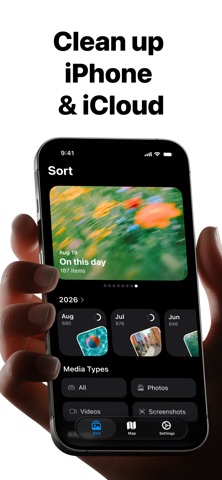
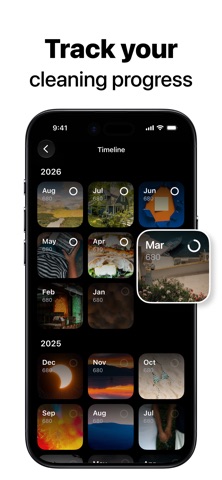
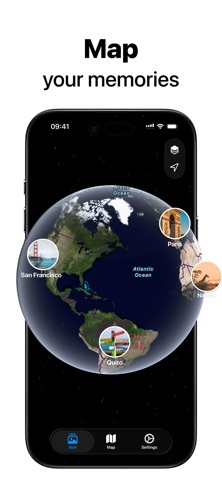
CleanKit helps you clean and organize your photo library with fast, intuitive gestures. Swipe right to keep, swipe left to remove, and review your photos naturally. Clean up screenshots, photos, Live Photos, and videos while staying in control of every decision. Need to clean thousands of photos? Use gesture-based batch management to quickly select, delete, favorite, or organize multiple photos at once. Add photos directly to albums while reviewing, turning cleanup into a simple and seamless workflow. Rediscover your memories with Photo Map. Explore photos by location and revisit the places behind your favorite moments. Why CleanKit - Swipe to clean photos, screenshots, Live Photos, and videos - Batch manage photos with intuitive swipe gestures - Select, delete, favorite, and organize multiple photos at once - Add photos directly to albums while cleaning - Keep favorites with one tap - Undo anytime if you change your mind - Browse your library by month - Rediscover memories with Photo Map and On This Day - Review items in Trash Preview before permanent removal Designed for control Nothing is deleted immediately. Photos move to Trash Preview first, giving you time to review, recover, or remove them whenever you choose. Designed for privacy Your photos stay on your device. Nothing is uploaded. Nothing is shared. CleanKit Pro Unlock premium features with CleanKit Pro. Payment will be charged to your Apple Account at confirmation of purchase. Subscriptions automatically renew unless canceled at least 24 hours before the end of the current period. You can manage or cancel subscriptions in your App Store account settings. Privacy Policy: https://cleankit.gitbook.io/about/privacy-policy Terms of Use: https://cleankit.gitbook.io/about/terms-of-use
Latest release
What’s New
We’ve refreshed the Home experience to make browsing and organizing your photos easier. • Explore On This Day memories across the last 7 days • Organize and browse your photo library by album Thanks for using CleanKit! If you run into any issues, feel free to contact us at cleankit_app@outlook.com.
Audience growth
Ratings growth
Baseline captured. Growth appears after the crawler observes a changed rating count.
Momentum comes from crawler snapshots for the tracked storefront. “Viral growth signal” means unusually fast recent rating gains; it is an indicator, not download data.
Price tracking
Price intelligence
First snapshot captured. The trend line starts after the next crawler price observation.
- First observed Sep 14, 2026 · 5:55 PM Free
Screenshots