About this app
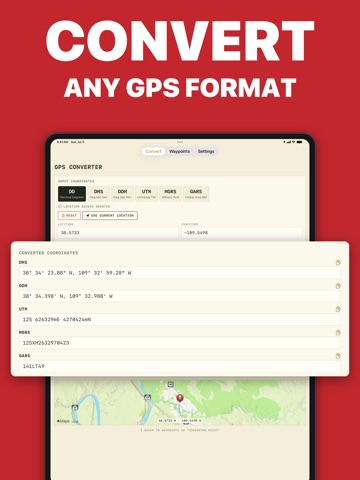
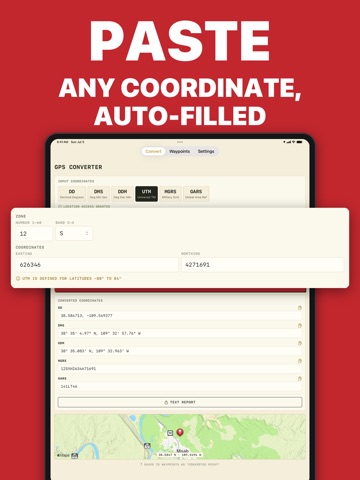
MyGPSConverter - Offline GPS Coordinate Conversion Tool Quickly convert your current GPS location into multiple coordinate formats—even without a data connection. Perfect for hikers, responders, military personnel, and map users needing accurate offline location conversions. Capture your current longitude and latitude, paste coordinates from other sources, or enter any location manually. Convert and view your position across popular reference systems used in paper maps, SAR operations, and field reports. All conversions are stored in a history log for easy access later. Key Features: • Converts coordinates between multiple supported formats • Supports DD, DMS, DDM, UTM, MGRS, and GARS • Works entirely offline—no signal or internet required • Smart input fields auto-parse pasted coordinates • Save and revisit converted locations with the built-in history log • Share any converted location via text, email, or clipboard • 100% ad-free and privacy-focused—no tracking or data collection Supported Coordinate Formats: • DD (Decimal Degrees) Simple format using decimal values for latitude and longitude. Example: 37.774945, -122.419434 • DMS (Degrees, Minutes, Seconds) Traditional format expressing degrees, minutes, and seconds. Example: 37°46'29.6"N, 122°25'09.8"W • DDM (Degrees and Decimal Minutes) Combines whole degrees with decimal minutes. Example: 37°46.493'N, 122°25.164'W • UTM (Universal Transverse Mercator) Metric, zone-based grid system used for detailed maps. Example: 10S 551000mE, 4182000mN • MGRS (Military Grid Reference System) Refines UTM into alphanumeric grid squares for high precision. Example: 10SEG5510028200 • GARS (Global Area Reference System) Military grid dividing the globe into 30-minute cells. Example: 006AG3 Ideal for hikers, emergency responders, military personnel, and anyone needing accurate coordinate conversions in the field.
Latest release
What’s New
This is MyGPSConverter's biggest update yet — a full redesign plus our most-requested features. A NEW LOOK - Complete visual refresh, redesigned for fast reading in the field - Full dark mode support - A quick welcome tour for new users (replay it anytime from Settings) MAPS & WAYPOINTS - Map preview below every conversion — confirm the exact spot at a glance - New waypoint detail screen: map preview, editable labels, and notes - Import and export waypoints as GPX files — works with Gaia, onX, Garmin, and other mapping tools - Shareable text report with all formats, from both the converter and any saved waypoint 8 LANGUAGES - Now available in English, Spanish, French, German, Italian, Portuguese (Brazil), Indonesian, and Turkish — set it in Settings or follow your device language ACCURACY & RELIABILITY - Fixed rare MGRS and UTM conversion errors near zone boundaries and the antimeridian - Smarter paste detection handles even more coordinate styles - Every conversion is now verified by an automated test suite sweeping coordinates across the entire globe Conversions still work 100% offline — no internet, no tracking, no account.
Audience growth
Ratings growth
Baseline captured. Growth appears after the crawler observes a changed rating count.
Momentum comes from crawler snapshots for the tracked storefront. “Viral growth signal” means unusually fast recent rating gains; it is an indicator, not download data.
Price tracking
Price intelligence
First snapshot captured. The trend line starts after the next crawler price observation.
- First observed Aug 31, 2026 · 9:39 PM Free
Screenshots