About this app
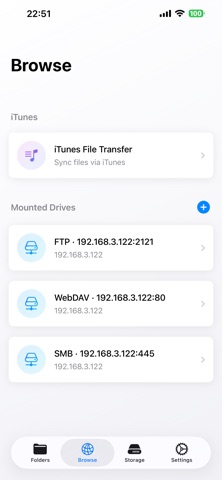
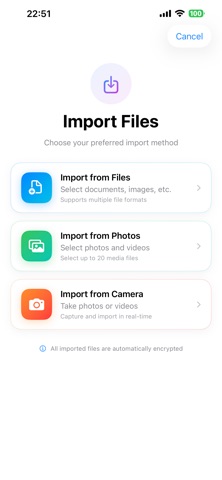
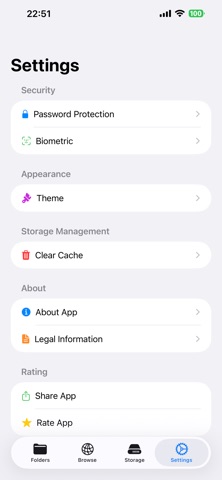
## Your Digital Privacy Guardian Privacy Vault is a professional-grade private file management application designed specifically for iOS. It employs military-grade AES-GCM encryption technology to provide bank-level security protection for your sensitive files. ## Core Functions ### Military-Grade File Encryption * AES-GCM Encryption Algorithm: Military-grade encryption standard using a 256-bit key. * PBKDF2-SHA256 Key Derivation: 100,000 iterations to ensure password security. * Random Salt Generation: Generates a 32-byte random salt for each encryption, preventing rainbow table attacks. * Individual File Passwords: Each file can have an independent password for double protection. ### Multiple Unlocking Methods * Face ID / Touch ID: Biometric unlocking. * Numeric Password: Supports strong password strategy verification. * Smart Authentication: Automatically selects the best unlocking method based on device capabilities. ### Comprehensive File Management * Multi-Format Support: Supports all formats including images, videos, documents, and audio. * Folder Management: Create, rename, move, and delete folders. * Batch Operations: Batch encryption, decryption, move, and rename. * Smart Search: Multi-condition search and tag system. ### Convenient Import Function * File Import: Supports importing all file types. * **Photo Import:** Batch import of multiple photos and videos. * **Photo Import:** Directly capture and save photos to the vault. * **Keep Original Names:** Automatically preserves original filenames. ### Secure Preview System * **Encrypted File Preview:** Preview encrypted content by entering a password. * **Multi-Format Support:** Preview images, videos, PDFs, and audio. * **Temporary Decryption:** Automatically cleans up temporary files after previewing. * **QuickLook Integration:** System-level preview experience. ### NAS Network Storage Support * **Multi-Protocol Support:** Supports three mainstream network storage protocols: SMB, FTP, and WebDAV. * **Quick Connection:** One-click connection to home NAS, enterprise file servers, and cloud storage services. * **Secure Transfer:** Supports encrypted connections (SMB encryption, FTP over SSL/TLS, HTTPS). * **File Synchronization:** Supports downloading files from the NAS to the local vault or uploading encrypted files to the NAS. * **Online Browsing:** Directly browse NAS files and preview them without downloading. * **Password Management:** Automatically saves connection passwords to the Keychain for security and convenience. * **Multi-Server Management:** Supports simultaneous connection to multiple NAS devices. Server Switching, Fast ### Personalization * Theme System: Multiple preset themes and custom colors * Interface Enhancement: Modern UI design, smooth animations * Storage Monitoring: Real-time disk space usage * Statistics: File count, encryption status statistics ## Security Features * Local Storage: All data is stored locally, never uploaded to third-party servers * Sandbox Protection: Strictly adheres to iOS sandbox security mechanisms * Memory Protection: Sensitive data is immediately cleared after use * Background Lock: App automatically locks for protection when entering the background ## Applicable Scenarios * Personal Privacy: Protection of private photos, videos, and documents * Business Documents: Encryption of contracts, agreements, and financial statements * Learning Materials: Management of important notes, certificates, and documents * Creative Works: Protection of design drafts, code, and creative documents ## Why Choose Us * Professional-Grade Encryption: Uses bank-grade AES-GCM encryption algorithm * Multiple Protections: Biometric identification, digital passwords * User-Friendly: Modern interface, simple and intuitive operation * Privacy First: Local storage, never uploaded to third-party servers * Continuous updates: Regular updates and continuous optimization of the user experience.
Latest release
What’s New
• OneDrive: Connect to Microsoft OneDrive to browse, upload, download, and manage files in the cloud • SFTP: Connect to SFTP servers to manage remote files; password can be saved • Extract: Support for ZIP, TAR, 7z, GZip, TAR.GZ, and TGZ; extract to current folder or choose a destination • Connection: Protocol options are now grouped as “Cloud” and “Server” for clearer selection • Improvements: Better experience and stability for Dropbox and batch uploads
Audience growth
Ratings growth
Baseline captured. Growth appears after the crawler observes a changed rating count.
Momentum comes from crawler snapshots for the tracked storefront. “Viral growth signal” means unusually fast recent rating gains; it is an indicator, not download data.
Price tracking
Price intelligence
First snapshot captured. The trend line starts after the next crawler price observation.
- First observed Aug 21, 2026 · 8:16 AM $2.99
Screenshots