About this app
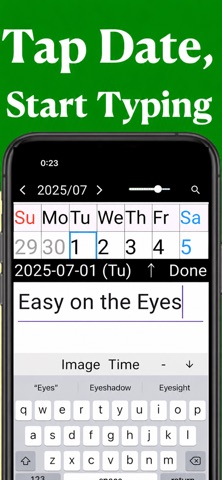
▼ Large Text, Easy-to-Read Calendar Senior Calendar is a simple and easy-to-use calendar app designed for people in their 40s, 50s, 60s and beyond, as well as seniors and older adults. In addition to its simple and intuitive operation, one of its biggest features is the ability to freely adjust the text size. *You can change the text size using the slider at the top of the screen. Perfect for those who find small text difficult to read due to presbyopia or changes in eyesight. You can also make the text smaller, making the app comfortable to use for younger generations as well. (The simple design makes it easy for anyone to use.) ▼ Try Different Calendar Styles 1. Wall-style monthly calendar 2. Vertical schedule calendar 3. Two-column planner-style calendar You can easily switch between styles using the tabs at the bottom of the screen. Try different views for checking and planning your schedule, and use the one that works best for you. ▼ Recommended for ・Anyone looking for a large-text, easy-to-read calendar ・Those who want a simple, easy-to-use calendar app ・People with presbyopia who find small text difficult to read ・Those who want a simple calendar without unnecessary features ・People in their 40s, 50s, 60s and beyond who want a clear calendar ・Families looking for an easy-to-use calendar for older family members ▼ Main Features ・Freely adjustable text size ・Add schedules using large, readable text ・3 different calendar styles ・Simply tap a date to quickly enter a schedule ・Tag feature for adding schedules to multiple days at once ・Large text that is easy to read even without reading glasses For people in their 40s, 50s, 60s and beyond, for seniors and older adults, for those with low vision or presbyopia, and for anyone who prefers a simple design. If you are looking for an "easy-to-read" calendar with "large text," give Senior Calendar a try. -- Terms of Service https://foodmenu.world/seniorCalendar/en/tos Privacy Policy https://foodmenu.world/seniorCalendar/en/privacy
Latest release
What’s New
Big fix
Audience growth
Ratings growth
Momentum comes from crawler snapshots for the tracked storefront. “Viral growth signal” means unusually fast recent rating gains; it is an indicator, not download data.
Price tracking
Price intelligence
- First observed Aug 23, 2026 · 11:53 PM Free
Screenshots