About this app
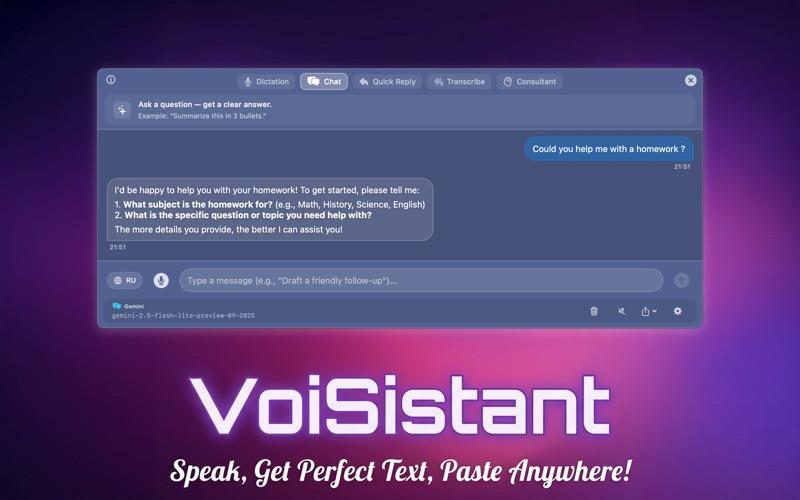
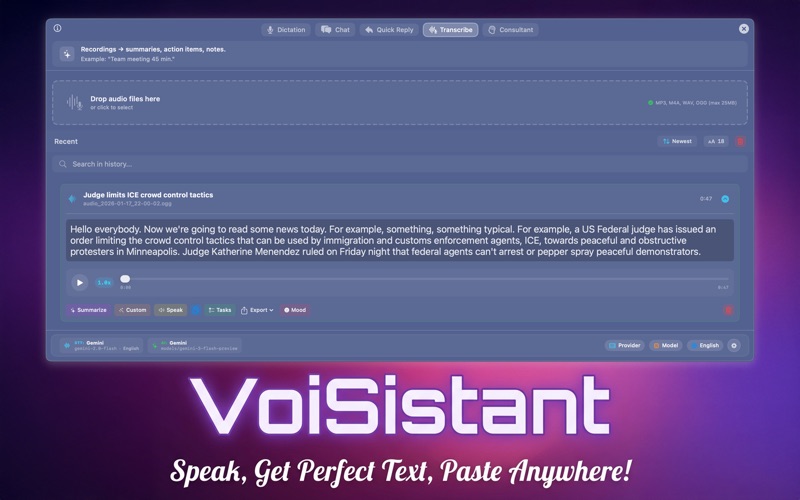
VoiSistant turns your speech into ready‑to‑send text. Record with a hotkey, get clean output refined by your favorite LLM, translate into other languages, apply useful transformations, and paste the result into any input field in a single step. You can also have text read aloud with expressive, natural Microsoft TTS / Google Gemini TTS / OpenAi TTS voices. Five Powerful Modes • Dictation Mode: Voice to text with instant paste into any app. Essential for hands-free typing. • Chat Mode: Conversational AI assistant with customizable chatbots and voice input. • Consultant Mode: AI assistant with real-time translation and voice responses for meetings. • Transcribe Mode: Convert audio files and recordings to text with speaker detection. • Quick Reply Mode: Generate contextual responses based on conversation screenshots. Key features • Lightning‑fast speech‑to‑text with punctuation and smart formatting. • One‑tap AI cleanup: fix grammar, tone, and style using your chosen LLM. • Assistive Auto-Paste: Seamlessly inserts text into any app, reducing physical strain and keystrokes by 33%. • Instant translation between multiple languages (English, Italian, Spanish, Russian, and more). • Paste anywhere: automatically copies refined or translated text to your clipboard and inserts it where you work. • Provider choice: OpenAI, OpenRouter, Gemini, LM Studio, Ollama — switch anytime. • Microsoft TTS with natural, expressive voices for lifelike playback. • Global hotkeys and a compact menu bar UI — always available, never in your way. • Private by design: run locally for TTS; use cloud only if you enable it. • Post-processing pipeline: save to history, quick send to email, text cleanup, and more. Why VoiSistant • Produce polished text from voice in seconds — fewer edits, more flow. • Keep your workflow: no switching apps, just speak and paste. • Choose how it sounds and reads with adjustable TTS voices. Use Cases • Draft and send messages hands‑free, with perfect grammar (Dictation). • Translate replies across languages instantly (Dictation). • Create notes, tasks, and emails from voice and paste them directly (Dictation). • Have AI conversations with voice input and auto-speak responses (Chat). • Get real-time AI assistance during meetings and calls (Consultant). • Transcribe audio recordings and podcasts to searchable text (Transcribe). • Generate professional replies to emails and messages in seconds (Quick Reply). • Proofread and tone‑match dictated content with AI. • Listen to drafts with natural TTS for faster review. Requirements • macOS 14 or later • Microphone access for speech recognition • Network access for cloud LLM providers (optional; not required for local TTS) Permissions • Microphone: used to capture your voice for speech recognition. • Speech Recognition: used to convert your voice to text. • Network: used only when you enable cloud LLM providers. Support • Help center and contact: ugin.rnd@trendslab.pro • Privacy policy: https://trendslab.pro/voisistant-privacy-policy/ • Terms of use : https://trendslab.pro/voisistant-terms-of-use/
Latest release
What’s New
What's New in Version 2.0.0 Five Powerful Modes Introducing a complete suite of AI-powered tools • Chat Mode — Conversational AI with customizable chatbots • Consultant Mode — Real-time meeting assistant with translation • Transcribe Mode — Convert audio files to text • Quick Reply Mode — AI-generated contextual responses New TTS Providers • Google Gemini TTS support • OpenAI TTS support • Choose your preferred voice engine Post-Processing Pipeline • Save to history automatically • Quick send to email • Text cleanup and formatting • Export to file and more UI Improvements • Redesigned About section with mode descriptions • Improved subscription management • Updated dictation placeholder text Under the Hood • macOS 14+ required • Performance improvements • Bug fixes and stability enhancements
Audience growth
Ratings growth
Baseline captured. Growth appears after the crawler observes a changed rating count.
Momentum comes from crawler snapshots for the tracked storefront. “Viral growth signal” means unusually fast recent rating gains; it is an indicator, not download data.
Price tracking
Price intelligence
First snapshot captured. The trend line starts after the next crawler price observation.
- First observed Aug 8, 2026 · 5:26 PM Free
Screenshots