About this app
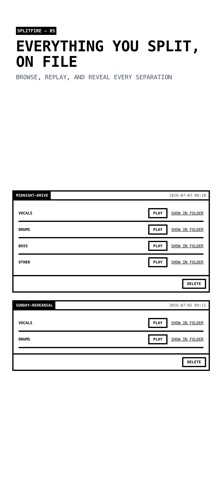
SplitFire splits any song into stems, right on your iPhone or iPad. Vocals, drums, bass, and more, extracted by AI that runs entirely on your device. No upload, no cloud, no queue. Your audio never leaves your machine. HOW IT WORKS - Pick any audio file: MP3, WAV, FLAC, M4A, AAC, or OGG - Choose an AI model: fast 4-stem, fine-tuned, or 6-stem separation - Get clean stems as WAV files, accelerated by your device's GPU WHAT YOU CAN MAKE - Karaoke tracks: remove the vocals from any song - Practice tracks: mute your instrument and play along - Backing tracks for bass, drums, or guitar - Acapellas, remixes, samples, and DJ edits PRIVATE BY DESIGN - 100 percent on-device processing - Works offline after a one-time model download - No account needed to separate audio SYNCED BY YOUR ICLOUD - Stems save to a SplitFire folder in iCloud Drive and sync across your iPhone, iPad, and Mac - Real files: open them in the Files app or drag them into your DAW on the Mac, no app needed - Sync runs through your own iCloud account, never through our servers - iCloud off? Everything still works, stored locally on your device AND MORE - History: browse everything you have separated on any device, with per-stem sync state - Optional free SplitFire AI account - Made by Splitfire AB in Sweden Support: https://splitfire.ai/contact
Latest release
What’s New
Bug fixes and performance improvements
Audience growth
Ratings growth
Baseline captured. Growth appears after the crawler observes a changed rating count.
Momentum comes from crawler snapshots for the tracked storefront. “Viral growth signal” means unusually fast recent rating gains; it is an indicator, not download data.
Price tracking
Price intelligence
First snapshot captured. The trend line starts after the next crawler price observation.
- First observed Aug 8, 2026 · 5:24 PM Free
Screenshots