About this app
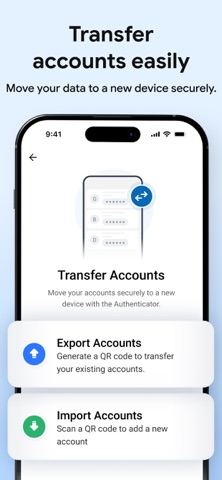
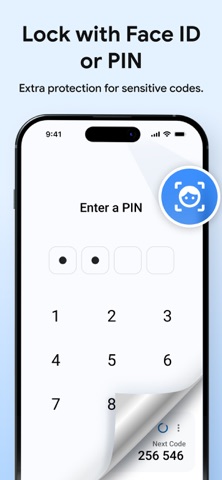
Secure Authenticator - 2FA is a simple and secure authenticator app that helps you manage 2FA codes, OTP verification codes, and account access in one place. Use Secure Authenticator to store your one-time passwords, preview upcoming codes, protect your credentials, and transfer your data safely when changing devices. Whether you need a reliable two-factor authentication app for personal accounts, work logins, email security, social apps, or online services, Secure Authenticator gives you a fast and convenient way to stay protected. Why choose Secure Authenticator - 2FA? • Securely store and manage 2FA and OTP codes • Quickly access one-time passwords • Preview upcoming authentication codes instantly • Backup and restore your data safely • Transfer accounts easily to a new phone • Protect sensitive login information with a secure experience • Simple, clean, and easy-to-use interface Key Features: • Authenticator for 2FA and OTP Store and manage your two-factor authentication accounts in one place for quick and reliable access. • Code Preview Instantly view upcoming authentication codes before they expire, making sign-ins faster and easier. • Password Vault Store and protect important credentials and sensitive login information in a secure environment. • Quick Transfer Move your data securely across devices in seconds when upgrading or switching phones. Perfect for everyday account security: Secure Authenticator is built for users who want: • a reliable authenticator app • easy OTP code access • secure 2FA backup and restore • smooth device transfer • better protection for everyday digital accounts From email and productivity apps to social media, finance, and business tools, Secure Authenticator helps keep your accounts safer with a simple and efficient authentication experience. Download Secure Authenticator - 2FA today and manage your OTP codes, two-factor authentication, password security, and device transfer with confidence. Subscription Options: • Payment will be charged to your Apple ID account at the time of purchase. • Subscriptions automatically renew unless auto-renew is turned off at least 24 hours before the end of the current period. • Your account will be charged for renewal within 24 hours before the end of the current period. • Manage or cancel your subscription anytime from your App Store account settings after purchase. Legal & Privacy: • View our Privacy Policy: https://privacypolicycenter.com/new/view/id6751569816 • Read our Terms of Use: https://privacypolicycenter.com/new/terms/id6751569816 • Read our EULA: https://privacypolicycenter.com/new/eula/id6751569816
Latest release
What’s New
- Performance Improvement. - Bugs Fixing.
Audience growth
Ratings growth
Baseline captured. Growth appears after the crawler observes a changed rating count.
Momentum comes from crawler snapshots for the tracked storefront. “Viral growth signal” means unusually fast recent rating gains; it is an indicator, not download data.
Price tracking
Price intelligence
First snapshot captured. The trend line starts after the next crawler price observation.
- First observed Aug 10, 2026 · 7:09 AM Free
Screenshots