About this app
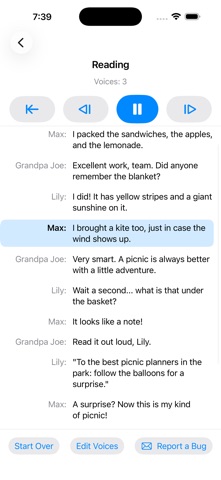
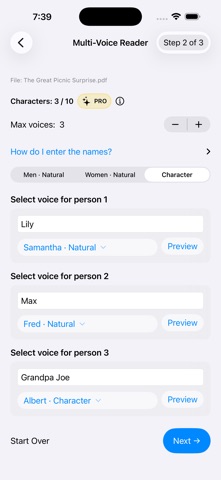
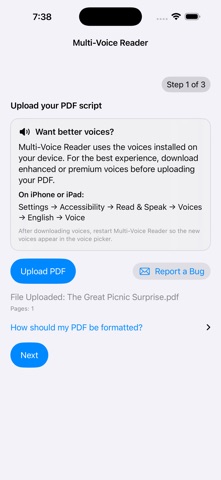
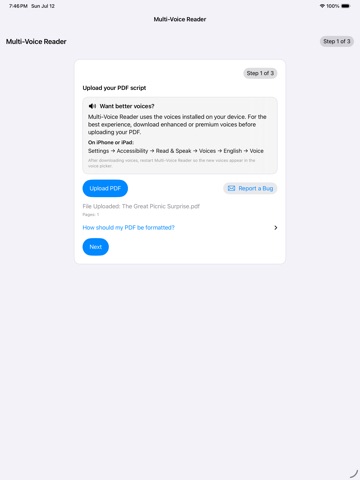
Bring scripts, stories, and dialogue to life with a different voice for every character. Multi-Voice Reader lets you upload a PDF, assign names and voices to each speaker, and listen as the conversation is read aloud using the voices installed on your device. Simply format your PDF like this: ——— SAMPLE FORMAT ——— Lily: What a beautiful day for a picnic! Max: I packed the sandwiches and lemonade. Grandpa Joe: Did anyone remember the blanket? —————————————— Multi-Voice Reader identifies each speaker from the name before the colon and automatically switches voices as the dialogue continues. FEATURES • Upload your own PDF scripts and stories • Assign a unique voice to each character • Preview voices before you begin • Follow along as the current line is highlighted • Pause, resume, skip forward, or return to an earlier line • Edit character names and voices at any time • Use enhanced and premium voices installed on your device • Works on iPhone, iPad, and Mac The free version supports up to 2 voices. Upgrade to Multi-Voice Reader Pro to use up to 10 character voices. GREAT FOR • Script read-throughs • Dialogue-heavy stories • Plays and screenplays • Writing review and proofreading • Character voice experimentation • Listening to your own creative work PDFs must contain selectable text. Scanned image-only PDFs are not supported. Your PDFs remain on your device and are not uploaded to an external service.
Audience growth
Ratings growth
Baseline captured. Growth appears after the crawler observes a changed rating count.
Momentum comes from crawler snapshots for the tracked storefront. “Viral growth signal” means unusually fast recent rating gains; it is an indicator, not download data.
Price tracking
Price intelligence
First snapshot captured. The trend line starts after the next crawler price observation.
- First observed Sep 8, 2026 · 3:12 AM Free
Screenshots