About this app
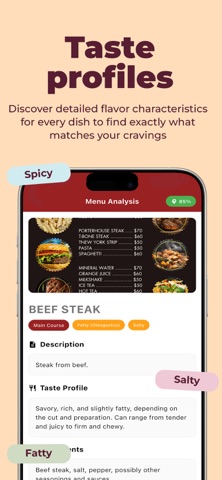
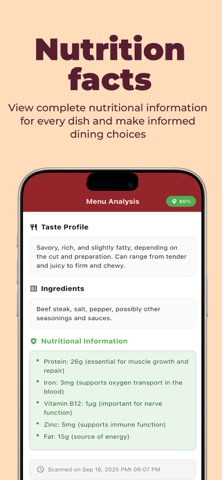
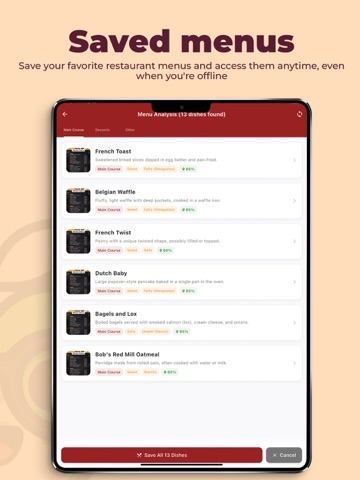
Discover what’s really on your plate with Dishup – the smart restaurant menu scanner and food analyzer. With just one snap, Dishup transforms any menu into a clear, detailed breakdown of dishes. Instantly uncover ingredients, taste profiles, nutritional values, and food categories to make smarter dining decisions in seconds. Key Features You’ll Love * Snap & Scan Menus Instantly No more confusion when looking at unfamiliar dishes. Simply take a photo of any restaurant menu, and Dishup will instantly analyze and display dish details in an easy-to-understand format. * Detailed Food Insights For every dish, discover: Key ingredients used Expected taste profiles (spicy, sweet, savory, sour, etc.) Nutritional breakdown (calories, proteins, fats, carbs) Special highlights like vegetarian, vegan, or gluten-free options * Smart Categorization Dishup automatically organizes dishes by Appetizer, Main Course, Dessert, Beverage, or even by taste and flavor profile. This makes it easier to decide what to try next. * Save Menus for Later Keep scanned menus stored securely in the app. Perfect for frequent travelers, food bloggers, or anyone who wants to revisit past dining experiences and compare dishes across restaurants. * Personalized Dining Experience Turn every meal into a discovery. Whether you want to eat healthier, explore new cuisines, or avoid certain ingredients, Dishup helps you make informed, confident dining choices. Why Choose Dishup? -Great for food lovers curious about new dishes. -A must-have for travelers dining in places with menus in unfamiliar languages. -Helpful for health-conscious eaters tracking nutrition and diet. -Useful for students and professionals in food, nutrition, or hospitality. Perfect for food lovers, travelers, and health-conscious eaters who want to know what they eat before ordering. Scan any menu with your phone. Discover every dish with detailed insights. Enjoy dining with confidence wherever you are. privacy policy - https://sites.google.com/view/menu-scan/home term of use - https://www.apple.com/legal/internet-services/itunes/dev/stdeula/
Latest release
What’s New
improve the ui and accuracy
Audience growth
Ratings growth
Baseline captured. Growth appears after the crawler observes a changed rating count.
Momentum comes from crawler snapshots for the tracked storefront. “Viral growth signal” means unusually fast recent rating gains; it is an indicator, not download data.
Price tracking
Price intelligence
First snapshot captured. The trend line starts after the next crawler price observation.
- First observed Aug 20, 2026 · 5:35 AM Free
Screenshots