About this app
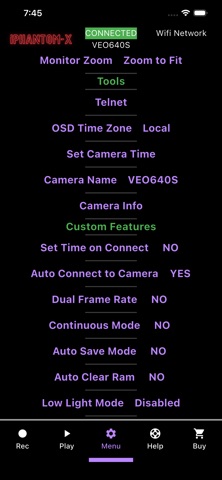
iPhantom-X Camera Control for Vision Research Phantom Cameras For over a decade the iPhantom brand has delivered for Phantom professionals worldwide. Wirelessly control any Phantom Camera from Vision Research through your iOS Device via hard line Ethernet connection or a Wifi Router Dramatically Increases workflow speed of all cameras Gives new life into older Phantom Cameras that previous required a tether computer From the "Record Page" Record, Trigger, Black Reference, OSD, FPS, Resolution, White Balance and more. From the "Playback Page" Advanced playback including super quick scrub, tap timeline to scrub, and more. Set in and out points and save clips to Cinemag or CF. In the "Menu Page" Adjust the most commonly used settings like fps, shutter angle, white balance, etc... Built in Telnet Send Telnet Commands to control advanced functions Never use a PC to control a Phantom again! Download iPhantom for free to access a handful of functions and to test your connection. Unlock complete functionality through in-app subscriptions. Setup is easy. Plug and Play Router Kits are available at www.iphantomapp.com There are many palm-sized Wifi routers on the market that can be powered through USB, and even some with built in battery, that can be connected to your Phantom camera through its Ethernet port. USB power can be provided by a small portable USB battery or by using an adapter cable like PTap to USB. With a plug and play router, or after following router setup instructions. It’s as easy as connecting your router to the Phantom Camera, connecting your iOS device to the routers Wifi signal, open iPhantom, and click "Detect IP" then click "Connect". See the built in Quick Start Guide or www.iPhatomApp.com for more information on setup. iPhantom-X will work with every Phantom Camera uses PH7 or PH16 protocol It has been thoroughly tested with the following cameras: Flex4K, VEO4K, Flex2K, Miro, v10, v12.1, v2511, v2512, v642 Requirements: A Phantom Camera by Vision Research A Phantom Network Cable, aka Phantom to Ethernet Cable A Wifi Router A Power Source for Wifi Router An iOS Device This app was not created or maintained by Vision Research. www.iPhantomApp.com iPhantom-X is a Subscription Based App Current Offerings 1) Annual Auto-Renewing Subscription 2) 14 Day Project License 3) 48 Project License • Payment will be charged to iTunes Account at confirmation of purchase • Auto Renewing Subscriptions automatically renew unless auto-renew is turned off at least 24-hours before the end of the current period • Account will be charged for renewal within 24-hours prior to the end of the current period, and identify the cost of the renewal • Subscriptions may be managed by the user and auto-renewal may be turned off by going to the user's Account Settings after purchase Terms of Use http://www.iphantomapp.com/terms-of-use/
Latest release
What’s New
Minor UI Updates -set Camera Name now properly uses Alpha Keyboard instead of decimal keyboard -hint Text is now 50% grey instead of full white
Audience growth
Ratings growth
Baseline captured. Growth appears after the crawler observes a changed rating count.
Momentum comes from crawler snapshots for the tracked storefront. “Viral growth signal” means unusually fast recent rating gains; it is an indicator, not download data.
Price tracking
Price intelligence
First snapshot captured. The trend line starts after the next crawler price observation.
- First observed Aug 20, 2026 · 12:55 AM Free
Screenshots