About this app
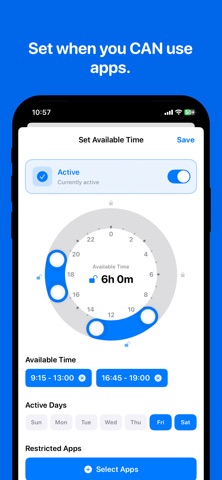
SCHEDULE YOUR APP ACCESS TimeBlock helps you build healthier digital habits by letting you schedule when apps are available. Instead of blocking apps completely, you define specific time windows when you can use them. SMART TIME CONTROL • Set multiple time slots per day (e.g., lunch break 12-1pm, evening 6-7pm) • Group apps together with custom schedules • Visual 24-hour ring shows your allowed times at a glance • Works with social media, games, and any app you choose STAY FOCUSED, STAY BALANCED Perfect for: - Staying productive during work hours - Building consistent daily routines - Breaking social media addiction - Studying without distractions - Improving sleep by limiting evening screen time HOW IT WORKS 1. Select apps you want to control (Instagram, TikTok, games, etc.) 2. Set time windows when these apps are allowed 3. Outside these times, apps are automatically blocked 4. When your scheduled time arrives, apps unlock automatically FEATURES • Whitelist approach: Only selected apps are controlled • Multiple time slots per group • Day-of-week scheduling • Intuitive time ring interface • No notifications or gamification—just simple time control • Works silently in the background WHY TIMEBLOCK? Unlike traditional app blockers that require you to fight urges, TimeBlock creates structure. You know exactly when you can use certain apps, making it easier to focus now and enjoy guilt-free relaxation later. REQUIREMENTS • iOS 15.0 or later • Screen Time permission (one-time authorization) • Works on iPhone only PRIVACY All data stays on your device. No tracking, no accounts, no data collection. Start building better digital habits today with TimeBlock! Privacy Policy - https://mud-magazine-e5d.notion.site/Privacy-Policy-2897b147815a80fb9a0ffb08c9207 c29?source=copy_link Term of Service - https://mud-magazine-e5d.notion.site/Terms-Conditions-2897b147815a8057939dd14ecc94326f?source=copy_link - https://www.apple.com/legal/internet-services/itunes/dev/stdeula/
Audience growth
Ratings growth
Baseline captured. Growth appears after the crawler observes a changed rating count.
Momentum comes from crawler snapshots for the tracked storefront. “Viral growth signal” means unusually fast recent rating gains; it is an indicator, not download data.
Price tracking
Price intelligence
First snapshot captured. The trend line starts after the next crawler price observation.
- First observed Aug 19, 2026 · 9:40 AM Free
Screenshots