About this app
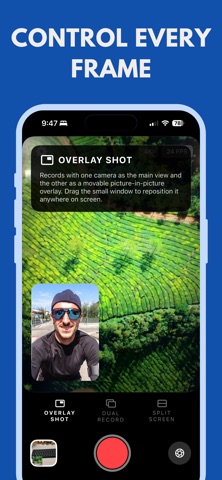
Dual Shot is the ultimate dual camera app that lets you record with both the front and back cameras at the same time. Capture your reactions and your surroundings together in one smooth take. Whether you are vlogging, traveling, interviewing, or creating content, Dual Shot helps you tell your story from every perspective. With three recording modes, you can easily switch between Split Screen, Overlay, and Dual Record to match your creative style. The app gives you full control over layout, lens, and preview, so every shot looks professional. You can preview in real time, adjust zoom, and choose your lens setup before you start recording. Features Dual Record - Record with both front and back cameras simultaneously and capture every moment as it happens Overlay Mode - Display one camera inside another for picture in picture style videos perfect for reactions or commentary Split Screen - Combine both camera views side by side for a clean and cinematic look Real Time Preview - Switch layout or lens anytime before or during recording for complete creative flexibility Adjust Zoom and Focus - Control each camera independently and fine tune your shot Save and Share - Export in high quality ready for TikTok Reels YouTube and any social platform Optimized for Performance - Smooth recording with minimal delay and smart lens switching Perfect For - Vloggers and content creators who want to record their reaction and environment at the same time - Travel storytellers who want to capture both scenery and self in one shot - Interviewers and journalists who need both perspectives in a single video - Reaction creators and reviewers who want a simple overlay workflow - Anyone who wants to make their videos more engaging and professional Why Choose Dual Shot Dual Shot makes dual recording simple and powerful. Unlike traditional camera apps, it allows you to film both sides of the story without editing or switching lenses manually. You can see both views live, customize layouts, and export instantly. Whether you are recording casual clips or creating cinematic videos, Dual Shot delivers the flexibility and quality you need.
Latest release
What’s New
minor bugs fixed and performance improvements
Audience growth
Ratings growth
Baseline captured. Growth appears after the crawler observes a changed rating count.
Momentum comes from crawler snapshots for the tracked storefront. “Viral growth signal” means unusually fast recent rating gains; it is an indicator, not download data.
Price tracking
Price intelligence
First snapshot captured. The trend line starts after the next crawler price observation.
- First observed Aug 15, 2026 · 4:49 PM Free
Screenshots