About this app
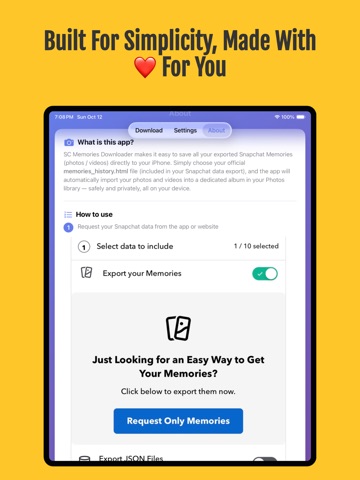
Snapchat allows users to export their Memories as an JSON file, but the exported data can not be downloaded on your device. iPhone users have no built-in way to import these memories directly to their Photos library. SC Memories Importer solves this problem by letting users import their exported (memories_history.json) file, which contains all their Snapchat photos and videos, directly on their iPhone. The app automatically downloads every memory, preserving original dates and location metadata, and saves them in a dedicated “SC_Memories” album in the Photos library for effortless organization and viewing. What is this app? Simply select your official (memories_history.json) file from your Snapchat data export, and the app will automatically import your photos and videos into a dedicated album in your Photos library — safely and privately, all on your device. Key Features: • Bulk Import- Instantly save your entire Snapchat history—thousands of photos and videos—with a single tap. • Timeline Perfect- Preserves original dates and metadata, so memories appear in your camera roll chronologically (e.g., a photo from 2018 stays in 2018), not as "new" photos. • Smart Organization- Automatically saves everything into a dedicated album in your Photos library, keeping your camera roll neat. • Direct ZIP Support- No need to unzip anything manually—just select your official Snapchat Data ZIP file and let the app do the rest. • Private & Secure- No login required. All processing happens on-device, and your memories go straight from Snapchat to your phone How It Works: 1- Request your Snapchat data from the Snapchat app or website. 2- Wait for Snapchat to prepare your export (usually within 24 hours). 3- Download the ZIP file and locate the memories_history.json file. 4- Open SC Memories Importer and select the file. 5- Tap “Download All Memories” to save them to your Photos library. Privacy First: All processing happens locally on your iPhone. The app never connects to Snapchat servers, never asks for your account details, and never uploads your data. Why We Created This App: Users can manually download their exported photos and videos one by one, but my daughter had over 5,900 memories — it took her three days to complete. That’s why I created this app. When her friends found out about it, they all wished they had a tool like this too. Disclaimer: • SC Memories Importer is an independent utility and is not affiliated with, endorsed by, or sponsored by Snapchat or Snap Inc. • This app is not a media downloader. It only processes the official exported file and organizes the user’s photos and videos in the Photos library, while preserving all original metadata.
Latest release
What’s New
- Support for Snapchat's new export format — photos and videos are imported straight from the ZIP, no download required. - Multi-ZIP support. When Snapchat splits a large library into several ZIPs, just pick them all at once. - Faster and lighter. Memories stream directly to your Photos library — import unlimited photos and videos.
Audience growth
Ratings growth
Momentum comes from crawler snapshots for the tracked storefront. “Viral growth signal” means unusually fast recent rating gains; it is an indicator, not download data.
Price tracking
Price intelligence
- First observed Aug 13, 2026 · 3:48 PM Free
Screenshots